AWS Data Sync (23rd Nov)
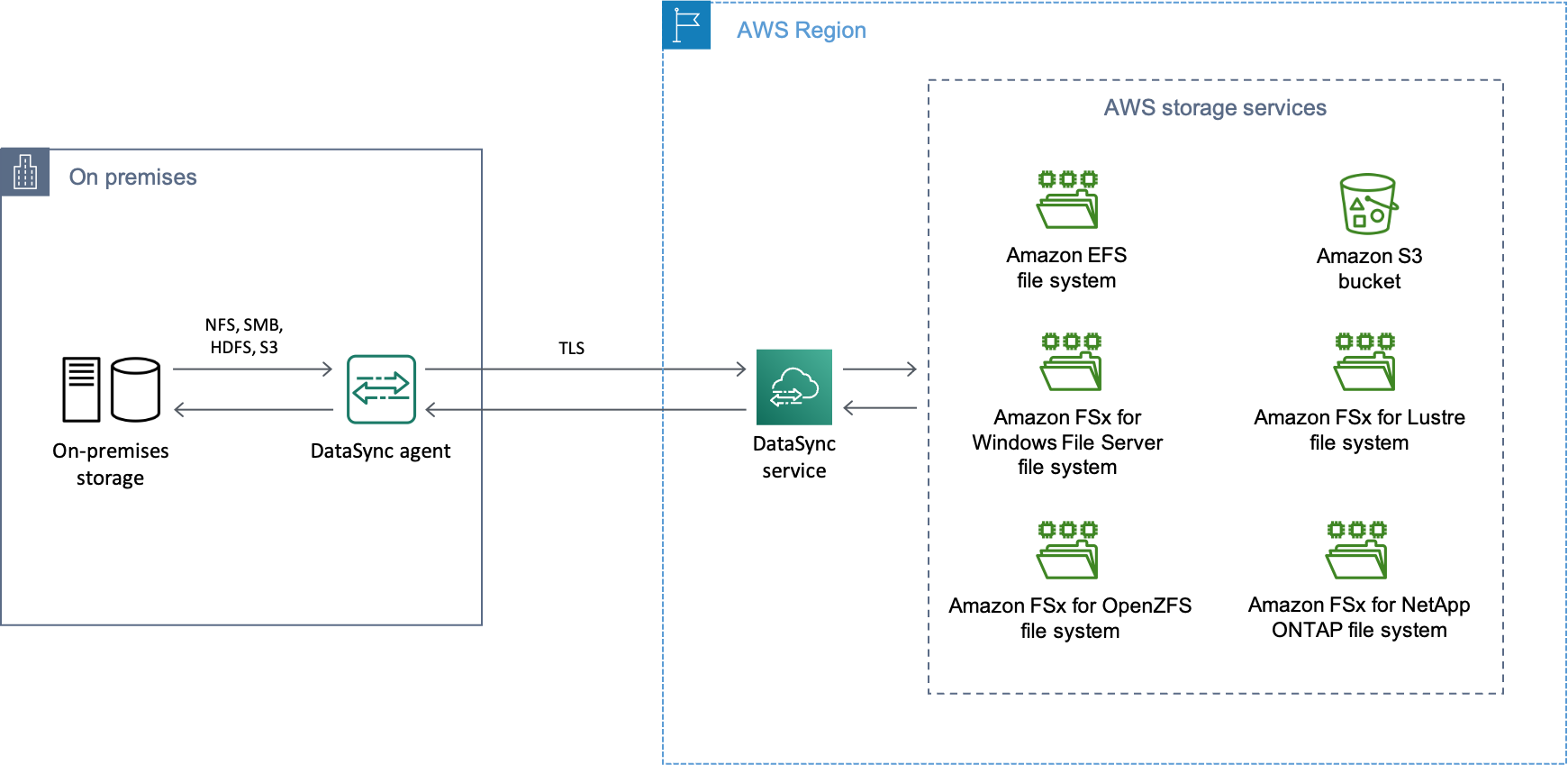
AWS DataSync is a fully managed data transfer service designed for high-volume, large-scale file-based data transfers. It automates much of the process, making it a reliable choice for moving data between on-premises storage systems and AWS services such as Amazon S3, Amazon EFS, and Amazon FSx.
DataSync supports various source and destination endpoints, including NFS, SMB, S3, EFS, and FSx.
- Key Features
- Components
- Snowball vs Data Sync
- Question: DataSync over AWS Direct Connect
- Question - Periodically back up small amounts of data to Amazon S3
Key Features
- Supports migrations, data processing, archival, disaster recovery (DR), business continuity (BC), and cost-effective storage solutions.
- Provides
incremental transfers,scheduled transfers, compression, encryption, andbuilt-in data validation. - Features
automatic error recoveryduring data transfer for reliability. - Integration with Amazon S3, Amazon EFS, Amazon FSx (for Windows File Server, Lustre, and OpenZFS).
- Pricing is based on the volume of data transferred (per GB).
Components
- Task: Defines the source, destination, and transfer options (e.g., transfer speed, schedule).
DataSync Agent: A software component that reads/writes data between on-premises NFS/SMB storage systems and AWS locations. This agent can be installed on your on-premises systems or on a virtual machine.- Location: Source and destination endpoints, such as NFS, SMB, S3, EFS, and FSx.
Snowball vs Data Sync
- Data Sync
- Best for electronic data transfers.
- Supports migrations, data processing, archival, DR/BC, and cost-effective storage.
- Ideal for ongoing or recurring transfers where automation and integration are required.
- Examples: Syncing on-premises file shares to Amazon S3 or EFS.
- AWS Snowball
- Best for offline data transfer.
- Useful for large-scale migrations when a significant amount of initial data needs to be transferred to AWS.
- Does not support the advanced features of DataSync.
Question - DataSync over AWS Direct Connect
A company receives 10 TB of instrumentation data each day from several machines located at a single factory. The data consists of JSON files stored on a storage area network (SAN) in an on-premises data center located within the factory. The company wants to send this data to Amazon S3 where it can be accessed by several additional systems that provide critical near-real-time analytics. A secure transfer is important because the data is considered sensitive. Which solution offers the MOST reliable data transfer?
- AWS DataSync over public internet
AWS DataSync over AWS Direct Connect(Correct Ans)- AWS Database Migration Service (AWS DMS) over public internet
- AWS Database Migration Service (AWS DMS) over AWS Direct Connect
Explanation:
- AWS DataSync is designed to securely and efficiently transfer large amounts of data from on-premises storage to AWS.
- AWS Direct Connect provides a private, high-bandwidth connection between your data center and AWS, ensuring secure and reliable data transfer. It improves performance and security for both services DataSync and DMS.
Why Not Option 4?
- MS is primarily
designed for database migrationsand continuous data replication between relational databases or certain NoSQL databases. - It focuses on structured data, not raw files such as JSON data. AWS DMS would
not be the ideal tool for this file transfer
Question - Periodically back up small amounts of data to Amazon S3
A company has NFS servers in an on-premises data center that need to periodically back up small amounts of data to Amazon S3. Which solution meets these requirements and is MOST cost-effective?
- Set up AWS Glue to copy the data from the on-premises servers to Amazon S3.
- Set up an AWS DataSync agent on the on-premises servers, and sync the data to Amazon S3.(
Correct Answer) - Set up an SFTP sync using AWS Transfer for SFTP to sync data from on premises to Amazon S3.
- Set up an AWS Direct Connect connection between the on-premises data center and a VPC, and copy the data to Amazon S3.
Explanation:
- AWS DataSync is designed to move data between on-premises storage (including NFS) and AWS services like S3.
- It handles incremental changes, encryption, and data integrity checks.
- You pay per GB transferred, with no need for long-term infrastructure setup or provisioning.
- It supports scheduled tasks, perfect for periodic backups.
Why the others aren't ideal?
- AWS Glue: Primarily for ETL (Extract, Transform, Load) workflows,
not file backup. It's overkill and not designed for syncing NFS data. - AWS Transfer for SFTP: Requires running and managing SFTP servers, better suited for user-driven file uploads.
- AWS Direct Connect: Provides dedicated networking but is costly and unnecessary for small, periodic backups.