AWS Cost Explorer
AWS Cost Explorer is a built-in tool that enables us to analyze, visualize, and export detailed cost and usage reports across your AWS account(s). It is a subset or section within the Billing and Cost Management Home. It provides:
- Graphical reports with breakdowns by service, linked account, usage type, or tag (e.g.,
user:username,department:finance). - Support for cost forecasting based on historical usage.
- Easy filtering and grouping of data.
- Exporting to CSV for custom analysis.
- No additional setup required—ready to use in the AWS Billing dashboard.
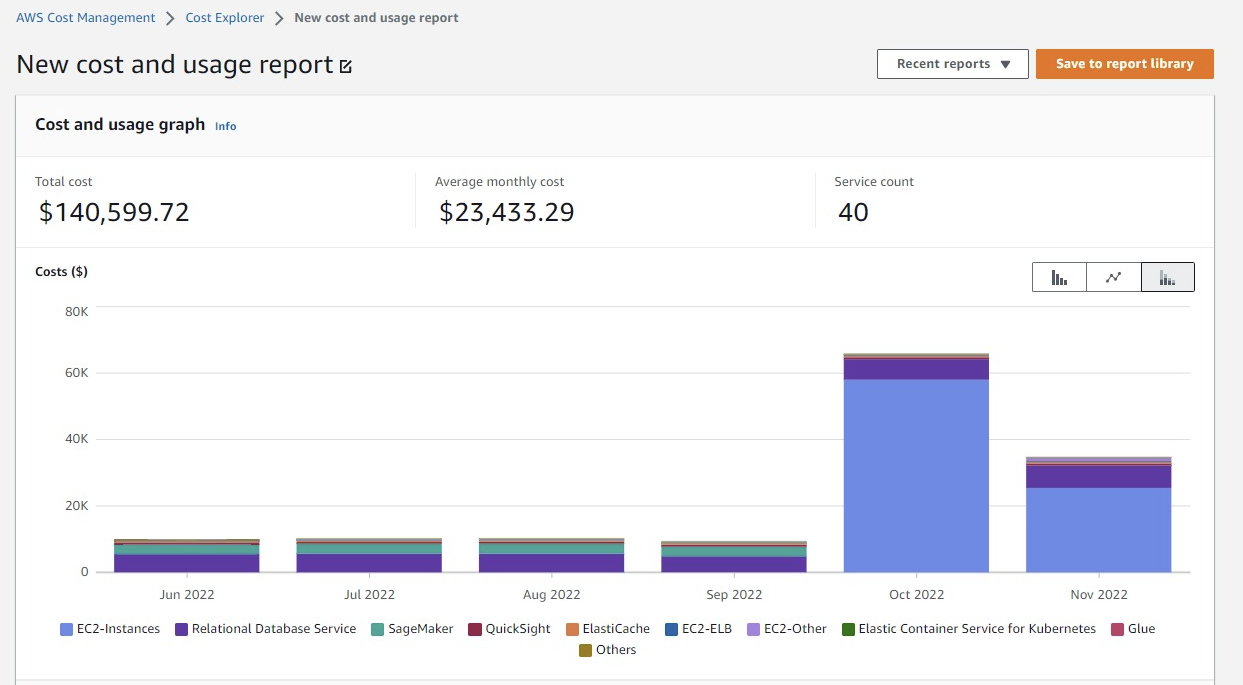
Question: Cost Explorer's granular filtering feature
A company observes an increase in Amazon EC2 costs in its most recent bill. The billing team notices unwanted vertical scaling of instance types for a couple of EC2 instances. A solutions architect needs to create a graph comparing the last 2 months of EC2 costs and perform an in-depth analysis to identify the root cause of the vertical scaling. How should the solutions architect generate the information with the LEAST operational overhead?
- Use AWS Budgets to create a budget report and compare EC2 costs based on instance types.
Use Cost Explorer's granular filtering feature to perform an in-depth analysis of EC2 costs based on instance types. (Correct Ans)- Use graphs from the AWS Billing and Cost Management dashboard to compare EC2 costs based on instance types for the last 2 months.
- Use AWS Cost and Usage Reports to create a report and send it to an Amazon S3 bucket. Use Amazon QuickSight with Amazon S3 as a source to generate an interactive graph based on instance types.
Explanation: Second option is the correct answer.
- AWS Cost Explorer allows graphical cost analysis supports filters for Service (EC2), Usage types and more.
- It's ready to use, requires no setup, and has low operational overhead, which is key to the question.
- It's ideal for quick comparisons and trends to investigate cost anomalies such as unwanted vertical scaling.
Why the Others Are Less Ideal?
- Use AWS Budgets: Budgets are for alerts and tracking against thresholds, not detailed analysis.
- Billing Dashboard Provide high-level summary of billing details. Bills do not break down by user.
- Use CUR + QuickSight: Technically powerful, but involves setup of S3 buckets, IAM, QuickSight, and data modeling.
Question: Cost Explorer and download report
At part of budget planning, management wants a report of AWS billed items listed by user. The data will be used to create department budgets. A solution architect needs to determine the most efficient way to obtain this report Information
Which solution meets these requirement?
- Run a query with Amazon Athena to generate the report.
- Create a report in Cost Explorer and download the report (
Correct Answer) - Access the bill details from the running dashboard and download Via bill.
- Modify a cost budget in AWS Budgets to alert with Amazon Simple Email Service (Amazon SES).
Explanation:
- Cost Explorer allows to break down costs by user which is typically how users are identified in AWS billing.
- Cost Explorer can generate detailed reports of AWS usage and costs based on filters such as user, service, and linked account.
- Also, download these reports in CSV format, which can be used to create department budgets and track costs efficiently.
Why not other options?
- Athena: Can be done using data export but it requires more setup (set up S3, build Athena tables).
- Running dashboard: Provide high-level summary of billing details. Bills do not break down by user.
- AWS Budgets: AWS Budgets and SES are for alerts, not for generating detailed reports.