Amazon Kinesis
Amazon Kinesis is a fully managed, serverless streaming data service, designed primarily for real-time data processing. They enable you to collect, process, analyze, and deliver streaming data quickly and efficiently.
Types of Amazon Kinesis:
- Kinesis Data Streams (KDS)
- Kinesis Data Firehose
- Kinesis Data Analytics
- Kinesis Video Streams
1. Kinesis Data Streams
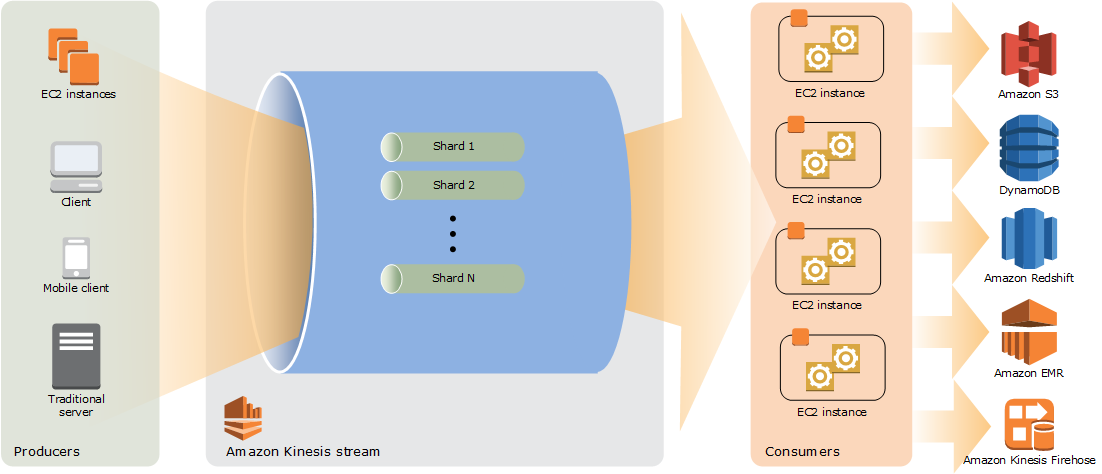
Kinesis Data Streams (KDS) is a more flexible and complex service than Kinesis Data Firehose. It is used for real-time data collection, processing, and storage of data records in a stream. It is designed for continuous processing and real-time analytics of high-throughput data streams.
Shards:- Kinesis Data Streams is composed of shards, and each shard is responsible for ingesting and storing data records.
- However, there is a limit to the number of shards you can have in a Kinesis Data Stream. By default, you can have up to 500 shards per stream, but you can request a limit increase by contacting AWS support if you need more shards.
- Increasing the number of shards can substantially increase the cost. Each shard is billed based on the capacity it consumes, which includes writes, reads, and storage.
Data record: It consists of a sequence number, a partition key, and an immutable data blob. KDS does not inspect, interpret, or modify the data in the blob. Each data blob can be up to 1 MB in size.Data Retention: By default, the retention period for a Kinesis Data Stream is 24 hours, but it can be configured from 1 hour to 7 days. With Kinesis Data Firehose integration, the retention period can beextended up to365 days.Data Storage: Kinesis Data Streams cannot directly write data to Amazon S3.To store data in S3, need to useKinesis Data Firehose.AWS Lambda Integration: Lambda integrates natively with Kinesis Data Streams for real-time processing and data handling.Batch Messagesin Kinesis Data Streams:- The PutRecord API in KDS is used to write a single data record into a specified shard of a stream.
- The PutRecords API allows you to send multiple records in a batch. The payload takes a list of records (up to 500 records per request) and processes them as a batch. This API helps reduce network calls and improve throughput.
2. Kinesis Data Firehose(Data Firehose)
- AWS has renamed Amazon
Kinesis Data Firehoseto AmazonData Firehose. - It is fully managed service that automatically
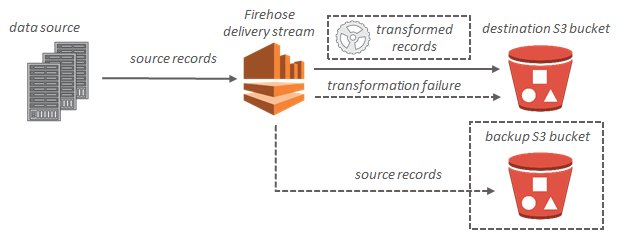
delivers streaming datato destinations. - It designed to stream data from sources like Kinesis Data Streams, applications, IoT devices, and CloudWatch Logs to destinations such as Amazon S3, Amazon Redshift, Amazon Elasticsearch Service (OpenSearch), and others. Vise versa is not possible - means, It cannot directly stream data from Amazon S3 to Amazon Kinesis Data Streams (KDS)
- It delivers streaming data to mainly
Fiveprimary destinations:- Amazon S3
- Amazon Redshift
- Amazon OpenSearch Service
- Splunk
- Custom HTTP endpoints
Important!: Itcannotdirectly write to anAmazon DynamoDB table. To write to Amazon DynamoDB or other destinations, you would need to use additional services like AWS Lambda for custom processing.
Key Features
- Real-Time Data Streaming: Firehose delivers data in
real-timeto your chosen destination. - No Data Retention: Firehose
doesn’t store data. It only transforms and delivers it to the target destinations. - Data Transformation: Firehose can transform incoming data (e.g., using AWS Lambda) before it is delivered to the destination.
3. Kinesis Data Analytics
- It allows to process and analyze real-time streaming data with
Apache Flink. It simplifies the process of building real-time stream processing applications for various use cases, such as log analytics, clickstream analytics, Internet of Things (IoT), ad tech, gaming, and more. - Kinesis Data Analytics
cannot directly ingest data from the sourceas it ingests data either from Kinesis Data Streams or Kinesis Data Firehose. - Key features:
- Streaming ETL (Extract, Transform, Load): Process and transform data in real-time before storing it in data lakes or databases.
- Continuous Metric Generation: Continuously compute metrics from incoming streams, such as system performance or user engagement statistics.
- Responsive Real-Time Analytics: Analyze and generate insights from live data streams for real-time decision-making.
- Interactive Querying of Data Streams: Use SQL or Flink to query data as it streams to quickly answer business questions and monitor trends.
- Kinesis Data Analytics for Apache Flink provides 50 GB of running application storage per Kinesis Processing Unit (KPU), ensuring efficient data handling and processing.
4. Kinesis Video Streams
- Real-time video ingestion, storage, and analysis for use cases like smart surveillance and video analytics.
5. Can Both KDS and KDF Be Used in Architecture?
Yes, both Kinesis Data Streams and Kinesis Data Firehose together in the architecture:
- Kinesis Data Streams collects real-time data from sources like sensors, applications, or logs. It temporarily stores data within shards and is designed for real-time streaming and processing. However, it does not store data in analytics tools like S3, Redshift, or Elasticsearch.
- Kinesis Data Firehose can ingest this real-time data from Kinesis Data Streams and automatically load it into storage or analytics tools like S3, Redshift, or Elasticsearch.
Athena vs Kinesis Data Analytics
- Amazon Athena is designed for querying data at rest stored in Amazon S3, ideal for historical data analysis. It’s not meant for real-time streaming.
- Amazon Kinesis Data Analytics is built for real-time stream processing, enabling you to analyze live data as it’s ingested from Kinesis Data Streams or Kinesis Data Firehose, making it ideal for applications like real-time tracking.
6. Kinesis Data Streams with Enhanced Fan-Out:
- Before Enhanced Fan-Out
- By default, the 2MB/second per shard output is shared among all consumers consuming data from the stream.
- All consumers had to share the same throughput from the shard, leading to limited scalability when multiple consumers were involved.
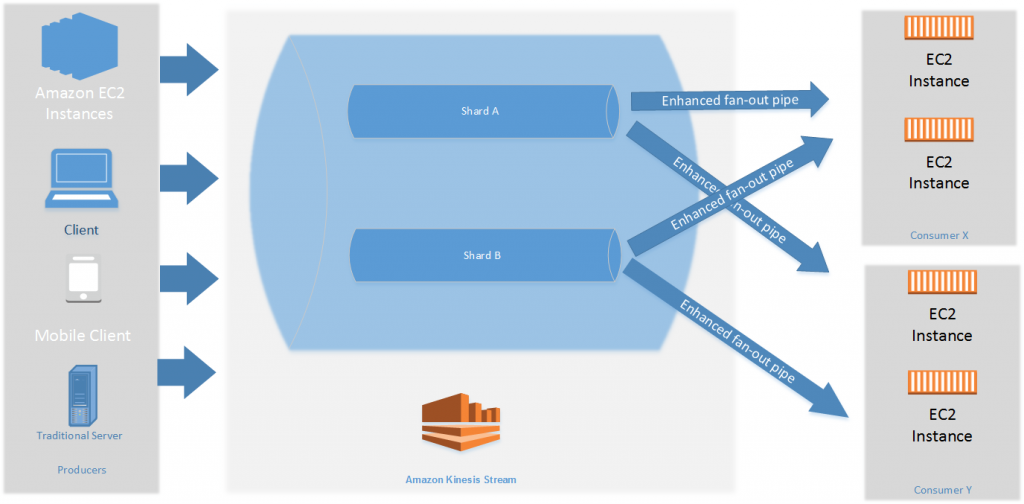
With Enhanced Fan-Out- With Enhanced Fan-Out, each consumer can now receive their own 2 MB/second throughput from a shard, enabling multiple consumers to read concurrently from the same shard.
- For instance, if a stream has 10 shards, each consumer gets access to 10 x 2 MB/second throughput.
- This enhances scalability significantly because each consumer gets dedicated throughput.
Enhanced Fan-Out is unique to Kinesis Data Streams and does not extend to other Kinesis products like Kinesis Data Firehose, Kinesis Data Analytics, or Kinesis Video Streams.
7. Question: Amazon Kinesis Data Analytics
A bicycle sharing company is developing a multi-tier architecture to track the location of its bicycles during peak operating hours. The company wants to use these data points in its existing analytics platform. A solutions architect must determine the most viable multi-tier option to support this architecture. The data points must be accessible from the REST API. Which action meets these requirements for storing and retrieving location data?
- Use Amazon Athena with Amazon S3.
- Use Amazon API Gateway with AWS Lambda.
- Use Amazon QuickSight with Amazon Redshift.
Use Amazon API Gateway with Amazon Kinesis Data Analytics.(Correct Ans)
8. Question: Amazon Kinesis Data Streams
A company runs an online marketplace web application on AWS. The application serves hundreds of thousands of users during peak hours. The company needs a scalable, near-real-time solution to share the details of millions of financial transactions with several other internal applications. Transactions also need to be processed to remove sensitive data before being stored in a document database for low-latency retrieval. What should a solutions architect recommend to meet these requirements?
- Stream the transactions data into Amazon Kinesis Data Firehose to store data in Amazon DynamoDB and Amazon S3. Use AWS Lambda integration with Kinesis Data Firehose to remove sensitive data. Other applications can consume the data stored in Amazon S3.
Stream the transactions data into Amazon Kinesis Data Streams. Use AWS Lambda integration to remove sensitive data from every transaction and then store the transactions data in Amazon DynamoDB. Other applications can consume the transactions data off the Kinesis data stream. (Correct An)
Explanation: Kinesis Data Firehose is optimized for simple use cases like streaming data into specific destinations such as Amazon S3, Amazon Redshift, or Amazon Elasticsearch Service. It does not allow multiple consumer applications to process data directly from the stream in real time.