Amazon Aurora and Aurora Global Database
1. Amazon Aurora
- Amazon Aurora is a fully managed relational database(
not a key-value database) service. - Compatible only with MySQL and PostgreSQL database engines.
- Support self-healing storage system.
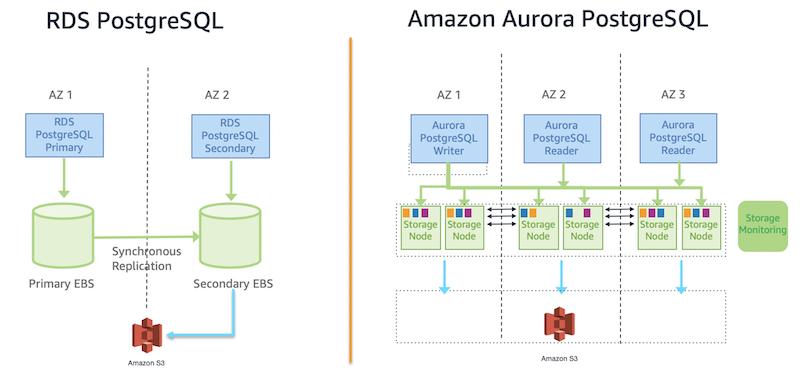
- Replicates data storage across 6 copies in 3 AZs, meaning each AZ gets 2 copies of data. This ensures high fault tolerance.
- Data storage can scale up to 128TB per database instance.
- Automatically scales in response to database growth, without manual intervention.
- Allows to create up to 15 read replicas for a single database cluster to increased read throughput and high availability.
- These read replicas are separate database instances that serve read-only queries. Replicas are synchronized with the primary instance using the shared Aurora storage layer.
- During a failover, Aurora promotes a read replica to the primary instance automatically, ensuring minimal downtime.
- Aurora uses priority tiers (0-15) to determine the order of read replica promotion. The replica with the lowest priority number (e.g., tier 0) is promoted first.
- If multiple replicas share the same priority tier, Aurora promotes the largest instance size for optimized performance.
- If replicas have the same tier and size, Aurora promotes one arbitrarily.
- Provides continuous backups to Amazon S3, supporting point-in-time recovery for data safety.
- Offers enhanced performance compared to traditional databases, with up to 5x faster throughput for MySQL and 3x faster for PostgreSQL.
- Detects and repairs storage failures automatically, maintaining system health without user intervention.
- Ensures data security with encryption at rest and in transit, and integrates with IAM for access control.
- Aurora Read Replicas are
independent endpointsin an Aurora DB cluster, best used for scaling read operations and increasing availability.
2. Aurora Global Database
Amazon Aurora Global Database is designed for globally distributed applications. It enables a single Amazon Aurora database to span multiple AWS regions, providing:
- Global Data Replication: Data is replicated across multiple AWS regions without impacting the performance of the database.
- Low Latency Reads: Allows fast local reads in each region.
- Disaster Recovery: In case of a region-wide outage, automatically redirecting traffic to a healthy region.
3. Cloning Databases in an Aurora DB Cluster
- Aurora enables fast database cloning, creating an exact copy of a database without duplicating data, using Copy-on-Write (CoW) technology.
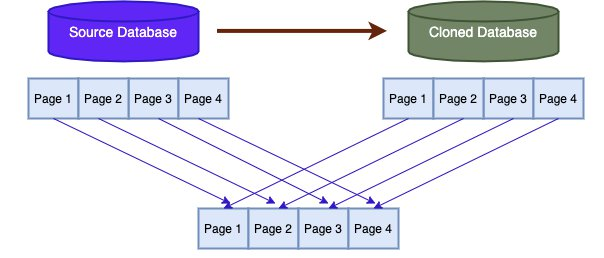
- CoW makes cloning faster and more storage-efficient compared to full backups/restores.
- How Copy-on-Write (CoW) Works
- Initial State:
- The cloned and source databases share the same data blocks (read-only).
- No actual data copying occurs unless data is modified.
- Write on Clone:
- If the clone modifies data, CoW creates a new copy of the changed block.
- The source database remains unchanged.
- Write on Source:
- Similarly, changes to the source database affect only its own copy.
- The cloned database remains unaffected.
- Isolation:Shared blocks act as a baseline, but each database keeps independent copies of modified data.
- Initial State:
- Examples of CoW
- Aurora Cloning: Clone shares the source’s storage initially; changes are stored separately.
- Virtual Machines: Multiple VMs from the same image share storage until modifications are made.
- Cloning vs. Backups
- Cloning: Fast and efficient for operational tasks like testing or analytics.
- Backups to S3: Suitable for long-term storage, compliance, or disaster recovery.
- Question: A company runs its production database on an Aurora MySQL DB cluster and the performance testing team wants access to multiple test databases that must be re-created from production data.
- Ans: Use database cloning to create multiple clones of the production database and use each clone as a test database
4. Aurora failover Handling
- Amazon Aurora: Does not standby instances. Instead, it promotes one of its read replicas to primary during failover.
- Amazon RDS: Provisions a standby instance (used only for failover) in Multi-AZ deployments.
Questions - EC2 Reserved Instances & Aurora DB
A company needs to migrate a legacy application from an on-premises data center to the AWS Cloud because of hardware capacity constraints. The application runs 24 hours a day & days a week. The application database storage continues to grow over time.
What should a solution architect do to meet these requirements MOST cost-affectivity?
- Migrate the application layer to Amazon FC2 Spot Instances Migrate the data storage layer to Amazon S3.
- Migrate the application layer to Amazon EC2 Reserved Instances Migrate the data storage layer to Amazon RDS On-Demand Instances.
- Migrate the application layer to Amazon EC2 Reserved instances Migrate the data storage layer to Amazon Aurora Reserved Instances. (
Correct Ans) - Migrate the application layer to Amazon EC2 On Demand Amazon Migrate the data storage layer to Amazon RDS Reserved instances.
Explanation:
- Application Layer (Amazon EC2 Reserved Instances):
- The application runs 24/7, indicating a steady and predictable workload. EC2 Reserved Instances provide significant cost savings (up to 75% compared to On-Demand Instances) for such consistent workloads by committing to a 1- or 3-year term.
- Spot Instances are not suitable because they are interruptible and not ideal for a 24/7 application requiring high availability.
- On-Demand Instances are more expensive than Reserved Instances for continuous workloads, making them less cost-effective.
- Data Storage Layer (Amazon Aurora Reserved Instances):
- The database storage grows over time, and Amazon Aurora is a managed, scalable, and cost-effective relational database service compatible with MySQL and PostgreSQL, suitable for legacy applications.
- Aurora Reserved Instances offer cost savings for predictable database workloads, similar to EC2 Reserved Instances, and are more cost-effective than RDS On-Demand Instances.
- Amazon S3 is not suitable for a relational database workload, as it is an object storage service, not a database engine.
- RDS Reserved Instances could be an option, but Aurora is generally more cost-effective and scalable for growing storage needs due to its architecture (e.g., automatic storage scaling and lower I/O costs).