EC2 (Elastic Compute Cloud)
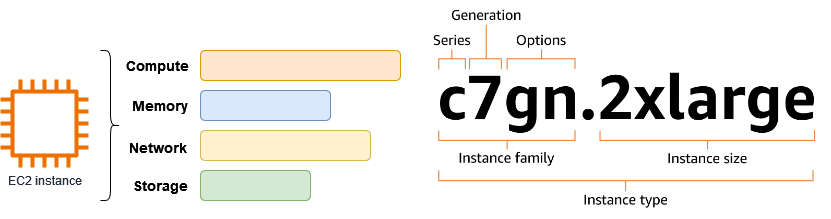
EC2 is a virtual server that provides on-demand, scalable computing capacity in the AWS cloud.
Other compute services
- Serverless Compute: AWS Fargate and Lambda offer serverless compute options.
- On-premises and edge compute: AWS Outposts, Local Zones, and Wavelength are used for running AWS compute on-premises and at the edge.
- Amazon Lightsail is a simplified, user-friendly version of AWS EC2. It designed for smaller-scale projects.
- Placement Groups
- Storage Options
- Types of EBS Volumes
- EC2 Instance Billing and Purchasing Options
- AMI in Amazon EC2
- AMI vs SNAPSHOT
- AMI Types
- Instance Metadata Service(IMDS)
- When EC2 instance terminates immediately after launch
- Intrusion Detection Systems (IDS) and Intrusion Prevention Systems (IPS)
- EC2 user data
- Security Group
- Auto Scaling groups
- Elastic IPs
- ENI vs ENA
- EC2 Instance Lifecycle
- Spot Instance Interruptions
- Launch Templates vs Launch Configurations
- EC2 Hibernate
- Nitro System
- Elastic Load Balancing with EC2
Placement Groups
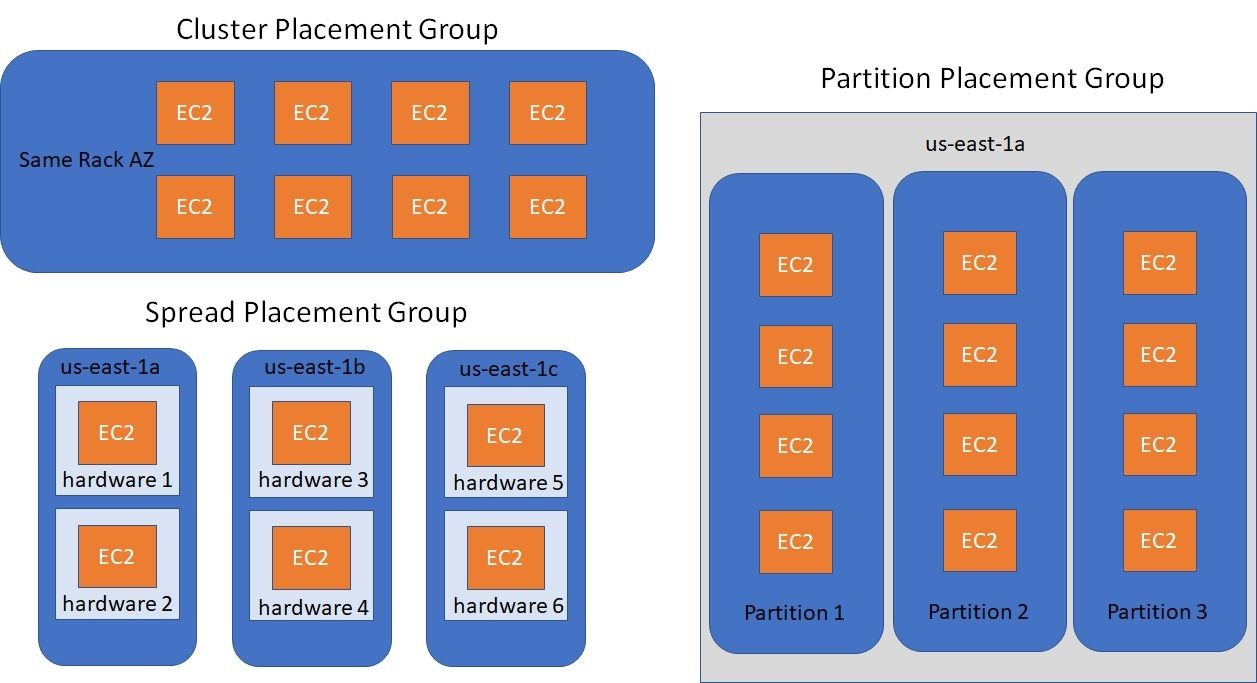
EC2 Placement Groups allow to influence the physical placement of EC2 instances within the AWS infrastructure. There are 3 types of placement groups: Cluster,Partition, and Spread.
- Cluster:
- All instances in a
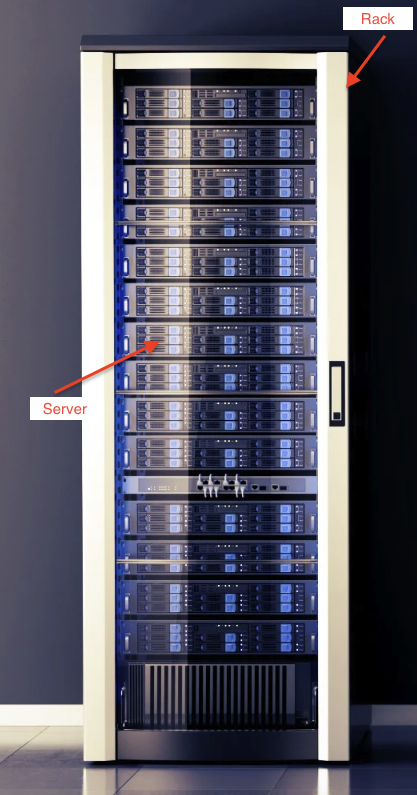
single rack within one Availability Zone (AZ). - Best for: Applications requiring
high network throughput and low latency(e.g., HPC, ML). - Risk: A rack failure affects all instances in the group.
- All instances in a
- Partition:
- Instances are divided into partitions, with each partition placed on separate racks.
- Can span multiple AZs.
- Limits: Up to 7 partitions per AZ; many instances per partition.
- Best for:
Distributedand replicated workloads (e.g., Cassandra, HDFS).
- Spread:
- Each instance is placed on a
separate racks. - Can span multiple AZs.
- Limits: Up to 7 running instances per AZ.
- Best for:
Small, critical workloadsrequiring maximum isolation and high availability (e.g., DNS servers, control plane nodes).
- Each instance is placed on a
Storage Options
Object Storage>> Amazon S3- Not EC2-attached directly; used for storing unstructured data like backups, logs, images, etc.
- Highly durable (99.999999999%), scalable, and supports lifecycle management.
File storage>> EFS (Linux instances only), FSx- Amazon EFS:
- Scalable, fully managed file system for Linux-based EC2 instances.
- Can be mounted on multiple instances simultaneously across AZs.
- Amazon FSx:
- Fully managed file systems for Windows (FSx for Windows File Server) or Lustre (FSx for Lustre).
- Supports Windows and Linux depending on the option.
- Amazon EFS:
File caching>> Amazon File Cache- Delivers temporary, high-speed cache for file-based workloads accessing data from S3, NFS, etc.
- Used for low-latency access to remote datasets.
Block Storage>> Instance Store and EBS- Instance Store Volumes:
- Temporary (ephemeral) storage physically attached to the host.
- Data is lost on stop, hibernate, or terminate.
- High-performance, low-latency, and suitable for caches, buffers, and replicated data.
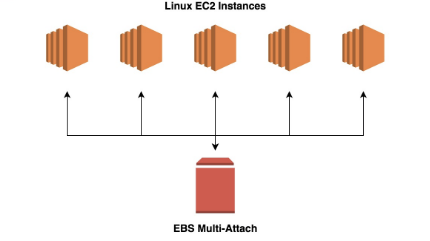
- Cannot use Multi-Attach
- Not all EC2 instance types support instance store.
- EBS(Elastic Block Store) Volumes:
- Durable and persistent storage, survives instance stop/terminate.
- Can take snapshots and restore data.
- Multi-Attach is supported only for io1/io2 volumes, and only with certain instance types, within the same AZ.
- Provisioned IOPS (io1/io2) offers high performance and low latency, but at higher cost.
- Instance Store Volumes:
Types of EBS Volumes
Amazon EBS provides persistent block storage volumes that can be attached to EC2 instances. Below are the EBS Volumes:
I → io1/io2(Provisioned IOPS SSD):- High-performance SSD for workloads that require high IOPS (up to 64,000 IOPS).
- Best for databases, big data analytics, and low-latency applications.
S → gp2/gp3(General Purpose SSD):- Balanced performance SSD suitable for balanced performance..
- Provides burstable performance with automatic scaling up to 3,000 IOPS.
S → st1(Throughput Optimized HDD)(Previous-generation):- HDD designed for throughput-intensive workloads like data warehousing.
- High sequential read/write performance at lower cost.
- AWS recommends avoiding using it for new workloads.
S → sc1(Cold HDD):- Low-cost HDD suitable for infrequent access data like backup and archival.
- High durability, but low IOPS and latency.
S → standard(Magnetic HDD)(Depreciated):- Older magnetic HDD used for non-performance-critical workloads.
- Suitable for cost-effective, warm data storage.
Trick to memorize the types of EBS volumes: "I Got Some Smart Storage".
EC2 Purchasing Options
- On-Demand Instances: Pay per second (Linux) or per hour (Windows) with no long-term commitment. Best for short-term, spiky, or unpredictable workloads.
- Savings Plans: Offer significant discounts in exchange for committing to a consistent hourly spend for 1 or 3 years. Best for flexible and dynamic workloads.
- Reserved Instances (RIs): Provide high discounts (up to ~72–75%) by committing to specific instance types for 1 or 3 years. Available as Standard (highest discount) or Convertible (more flexibility, lower discount). Best for steady, predictable EC2 usage.
Scheduled Instances (Discontinued in July 2023): Previously allowed reservations for recurring schedules. Recommended alternative: On-Demand + automation (e.g., EventBridge, Auto Scaling).- Spot Instances: Use spare EC2 capacity at up to 90% discount. Instances can be interrupted with short notice. Best for batch jobs, fault-tolerant workloads, CI/CD, big data, and containers.
- Dedicated Hosts: Rent an entire physical server for exclusive use. Ideal for bring-your-own-license (BYOL) scenarios (e.g., Windows Server, SQL Server). Provides host-level visibility and control.
- Dedicated Instances: Instances run(billed hourly) on single-tenant hardware, but without host-level visibility. Less commonly used than Dedicated Hosts.
- Capacity Reservations: Reserve EC2 capacity in a specific Availability Zone for any duration. Ensures capacity availability but charges apply whether used or not. Can be combined with Savings Plans or RIs to reduce cost.
AMI in Amazon EC2
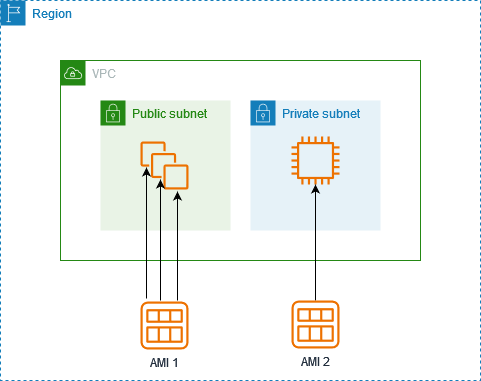
An AMI is like a full backup of your entire computer, including the operating system, installed programs, and settings. It allows you to create new computers (EC2 instances) that are exact copies of the one you backed up.
AMI Specifies
- Region: AWS Region where they are created. You can copy AMIs to other Regions if needed.
- Operating System: Defines the OS (e.g., Amazon Linux, Ubuntu, Windows Server)
- Processor Architecture: Specifies the CPU architecture (e.g., x86-64 or ARM64 ).
- Virtualization Type: Defines the virtualization mode: HVM (Hardware Virtual Machine) or, PV (Paravirtual)
- Launch Permissions: Controls who can use the AMI to launch instances
- Root Device Type: Determines where the root file system is stored: EBS-backed or, Instance store-backed
- Storage Details:
Includessnapshotsof volumes(e.g., root and additional volumes).- Specifies block device mappings for storage configuration.
- Other Metadata:
- AMI ID (unique identifier in the Region).
- Name and description.
AMI vs SNAPSHOT
- Snapshot: Saves a
point-in-time copy of the data on a specific volume(like your photos or documents). Itonly includes the data on the disk, not the operating system or configurations. - AMI:
Saves a complete copy of the entire system setup, including:- Operating System (OS)
- Software installed
- Data on the root volume
- Additional attached volumes (if specified)
Example - When a new AMI is copied from Region A into Region B. It automatically creates -
- a snapshot in Region B because AMIs are based on the underlying snapshots.
- an instance is created from this AMI in Region B. Hence, we have 1 Amazon EC2 instance, 1 AMI and 1 snapshot in Region B.
AMI(Amazon Machine Image) Types
An AMI is a master template or blueprint used to launch identical EC2 virtual servers.
- AWS-Provided AMI: AMIs maintained by AWS (e.g., Amazon Linux, Windows Server). Often used as a starting point for deployments.
- Custom AMI(Important for exam): An AMI created by users that includes custom software, configurations, and settings. Used to launch identical EC2 instances quickly.
- Public AMI: An AMI shared publicly by AWS or other users. Anyone can launch instances from it. Examples include official Ubuntu or Amazon Linux AMIs.
- Private AMI: An AMI accessible only within your AWS account or shared with specific accounts. Commonly used for internal applications and secure environments.
Golden AMI (Conceptual / DevOps Term)
- A pre-hardened, standardized Custom AMI containing OS, patches, security agents, and baseline software.
- Used to ensure consistency, security, and compliance across environments.
- Exams may describe the concept, but won’t test the term directly.environments.
Instance Metadata Service(IMDS)
Instance Metadata Service (IMDS) provided by AWS EC2 allows an instance to retrieve dynamic data about itself and its environment.This information is typically accessed via a specific URL within the instance. ip is always fixed - 169.254.169.254
http://169.254.169.254/latest/meta-data/
Question: A company needs to look up configuration details about how a Linux-based Amazon EC2 instance was launched. Which command should a solutions architect run on the EC2 instance to gather the system metadata?
Answer: The only way to retrieve instance metadata is to use link with ip 169.254.169.254
When EC2 instance terminates immediately after launch?
Possible Reasons for EC2 instance terminating immediately after launch are -
- Maximum volume limit reached: If reached the maximum volume limit, the instance may fail to allocate the required storage and terminate.
- Missing AMI: An EC2 instance cannot launch without a valid AMI, as it is required to create the root volume.
- Corrupt snapshot: If a snapshot used to create the instance is corrupt, the instance will fail to initialize and may terminate.
- Maximum EC2 instance limit reached: If the limit is reached, the instance launch will fail altogether, but it will not result in the instance being terminated—it simply will not be created.
Intrusion Detection Systems (IDS) and Intrusion Prevention Systems (IPS)
In AWS, IDS/IPS implementation is achieved using native services or third-party tools: The below are the Native AWS Services for IDS/IPS
- AWS Network Firewall: Traffic inspection and rule-based filtering.
- Amazon GuardDuty: Threat detection and anomaly monitoring.
- AWS WAF: Protects against web application attacks like SQL injection and XSS.
EC2 user data
EC2 user data allows you to provide configuration or initialization scripts when launching an EC2 instance. These scripts run automatically when the instance is first booted, enabling you to customize and configure your instances on startup.
Use Cases:
- Automated Configuration: Automate the installation of software packages, updates, or security patches when the instance is launched.
- Application Deployment: Deploy custom applications by downloading code or running deployment scripts.
- System Configuration: Configure system settings like network configurations, storage, or environment variables on instance boot.
#!/bin/bash
yum update -y
yum install httpd -y
service httpd start
Security Group(SG)
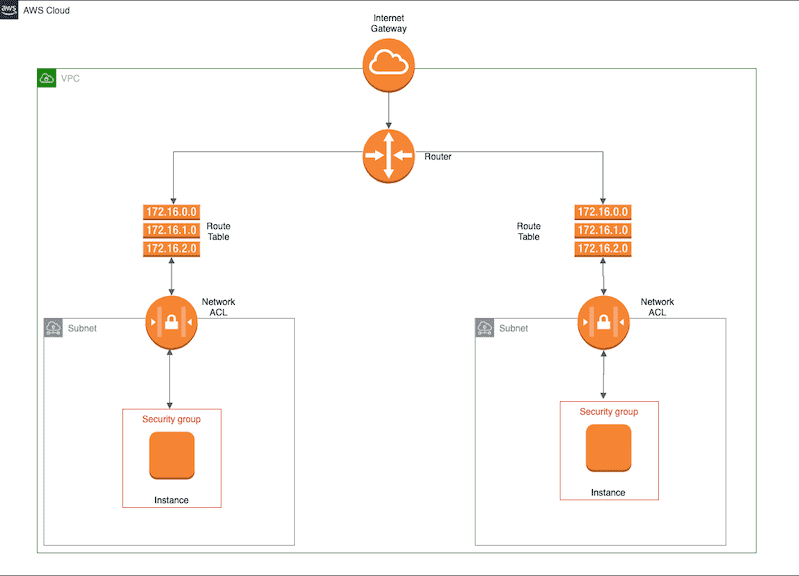
Security groups are designed to control network traffic to and from resources within a VPC. They act as virtual firewalls to protect EC2 instances, RDS instances, Elastic Load Balancers, Lambda functions, Redshift clusters, ElastiCache, and more.
Key Features of Security Groups
- During instance launch, one or more security groups can be specified. Default security group is used if not specified one.
- Rules within a security group allow or deny traffic to/from associated instances. Rules can be modified at any time.
- New rules are automatically applied to all instances associated with the security group.
- When deciding to allow traffic to an instance, all rules from all security groups associated with the instance are evaluated.
- By default, security groups allow all outbound traffic.
- Security group rules are always permissive; you cannot create rules that deny access.
- Security groups are stateful, meaning return traffic is automatically allowed based on existing connections.
Memorisation tips
- Security Groups(Layer 3/4) as the gatekeepers to your building, letting in only people who knock on the right door and speak the right language (IP, port, protocol).
- AWS WAF(Layer 7) as the security scanner at the front desk, checking for dangerous items or suspicious behavior after someone is allowed inside.
Auto Scaling groups(ASG)
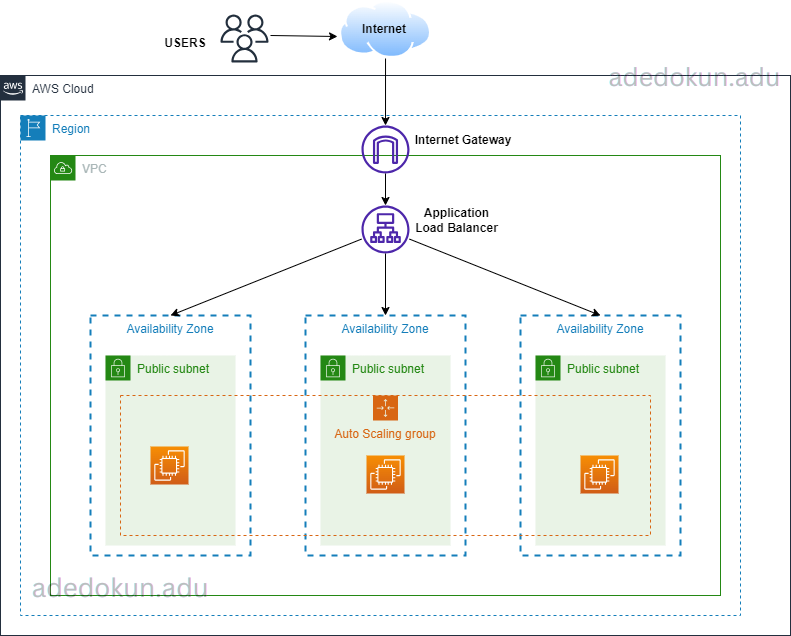
Auto Scaling group helps ensure high availability by automatically managing and scaling instances to handle changes in demand or failure. Here's how it functions:
- Health Monitoring: Continuously monitors the health of instances using Amazon EC2 health checks.
- Instance Replacement: Automatically terminates the faulty instance and launches a new one to replace it.
- Size Configuration: Auto Scaling groups allow you to define minimum, maximum, and desired capacity settings, which determine the limits and target size for the scaling actions.
- Maintaining Desired Capacity: Configured with a desired capacity — the number of instances the group should maintain at any given time.
- Scaling Policies: Automatically increase or decrease the number of instances based on specific metrics like CPU usage, network traffic, etc.
- Multi-AZ Support: Auto Scaling supports deploying instances across multiple Availability Zones (AZs)
within a single AWS region, ensuring high availability and fault tolerance. - Region Isolation:
ASG cannot span multiple AWS regions. They are confined to a single region to ensure resources and scaling activities remain within that region.
Elastic IPs (EIP)
- Static, public IPv4 address you allocate to your AWS account.
- Remains yours until you release it.
- Free only when associated with a running instance (charges if unused or associated with stopped instance).
- Use for consistent IP across instance restarts.
ENI vs ENA
- ENI (Elastic Network Interface) – Virtual network card, can attach/detach from instances, primary & secondary IPs.
- ENA (Elastic Network Adapter) – High-performance networking up to 100 Gbps (Nitro instances).
EC2 Instance Lifecycle
- Pending → Running → Stopping/Stopped → Terminated
- Pending = booting; Stopped = billed for storage only; Terminated = gone forever (root volume deleted if default).
- Hibernate pauses RAM to disk, skip boot.
Spot Instance Interruptions
- AWS can reclaim with 2-minute warning.
- Interruption options: Stop, Hibernate, or Terminate (choose at request).
- Best for fault-tolerant, flexible workloads.
Launch Templates vs Launch Configurations
Launch Template–Newer, supports versioning, mixed purchase options, tagging, T2/T3 Unlimited, etc.- Launch Configuration – Legacy, no versioning, must recreate to change settings.
Auto Scaling Groups now recommend to use Launch Templates.
EC2 Hibernate
- Saves RAM contents to EBS root volume when stopping.
- On start, reloads state instantly (faster than boot).
- Requires encrypted EBS root, supported instance families only.
- Useful for long-running processes needing quick resume.
Nitro System
- Modern AWS virtualization stack using dedicated hardware.
- Benefits: better performance, higher networking/storage speeds, better security isolation.
- Required for ENA/EFA, NVMe EBS.
Elastic Load Balancing with EC2
ELB distributes traffic across EC2s in multiple AZs. Health checks ensure traffic goes only to healthy instances. Types of ELB.
- ALB – Layer 7 (HTTP/HTTPS, path/host-based routing).
- NLB – Layer 4 (TCP/UDP, ultra-low latency, static IP).
- GLB – Gateway Load Balancer (for appliance routing).