Elastic Container Service(ECS)
Amazon ECS is a fully managed container orchestration service used to run, manage, and scale containerized applications on Amazon EC2 or AWS Fargate.
When creating an Amazon ECS Service:
- We choose a launch type: EC2 or Fargate
- EC2 launch type – containers run on customer-managed EC2 instances
- Fargate launch type – serverless containers with no EC2 management
- Services run inside an ECS cluster.
- We define:
- Task Definitions – describe one or more containers (image, CPU, memory, ports).
- Tasks – running instances of a task definition.
- Services – maintain a specified number of tasks and handle scaling, restarts, and deployments.
ECS and Kubernetes
ECS and Kubernetes do the same high-level job: they orchestrate and manage containers.
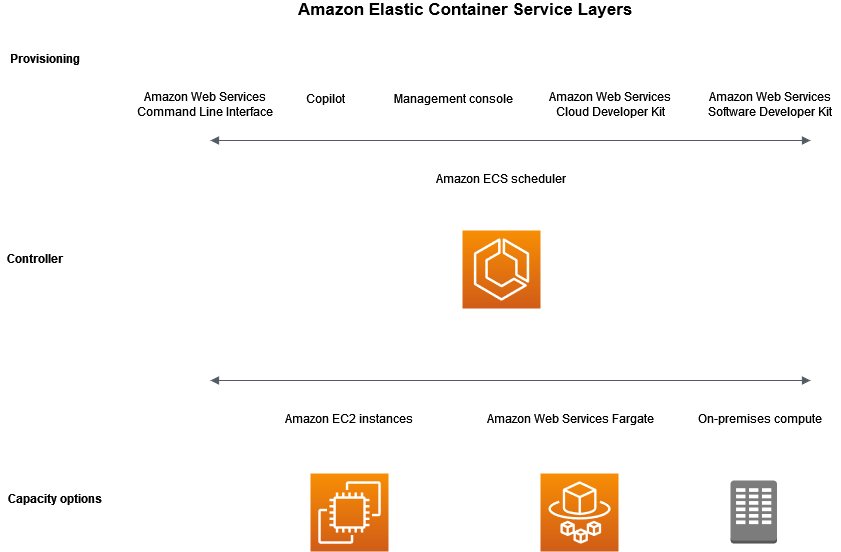
1. ECS on EC2 instances and on Fargate
- ECS on EC2 instances: You are responsible for managing the EC2 instances that run your containers. ECS just helps with orchestrating and scheduling containers on those EC2 instances. You can decide the type and size of the EC2 instances based on your needs.
- ECS on Fargate: If you don’t want to manage EC2 instances, you can use AWS Fargate, and ECS will automatically manage the compute resources for you.
2. When to use ECS on EC2
- You want to manage EC2 instances (the virtual servers where your containers run) and need more control over your infrastructure.
- If you have specific hardware requirements or want to tweak the EC2 instances for cost or performance reasons, you would use ECS on EC2.
- Analogy: It’s like renting a warehouse (EC2 instances) to store your containers (applications) and having control over the space.
3. Costing
- ECS with EC2 launch type is charged based on EC2 instances and EBS volumes used.
- ECS with Fargate launch type is charged based on vCPU and memory resources that the containerized application requests.
4. Docker image
- A Docker image is a read-only template or blueprint that contains everything needed to run an application (including code, libraries, environment variables, and configurations).
- Images are static. Once created, they don't change unless you rebuild or update them.
- Key Characteristics:
- Read-Only: An image cannot be modified once it's created.
- Reusable: You can create many containers from the same image.
- Stored: Docker images are stored in a repository, such as Docker Hub or AWS Elastic Container Registry (ECR).
5. Docker Container
- A Docker container is a running instance of a Docker image.
- Key Characteristics:
- Writable: Containers are mutable and allow you to change the application or its environment while it's running.
- Ephemeral: Containers are typically short-lived and can be stopped and removed. When stopped, their changes are lost.
- Isolation: Containers run in isolation from each other.
6. Docker Hub vs AWS Elastic Container Registry (ECR)
- Docker Hub
- Docker Hub is the default public container registry and repository for Docker images.
- Users can upload, share, and download Docker images from registry.
- Public and private repositories are available. Public repositories are free, but private repositories require a paid plan.
- AWS Elastic Container Registry (ECR):
- ECR is a fully managed container registry.
- Images stored in ECR can be pulled to run on Amazon ECS, EKS, or AWS Fargate.
- ECR is primary use case is for storing Docker images.
- Apart from Docker images, ECR also supports OCI (Open Container Initiative) compatible images.