AWS Lambda
Run code without provisioning or managing servers. You pay only for the compute time that you consume
- Lambda Function Limitations
- Lambda Best Practices
- Lambda@Edge vs AWS Lambda
- Question - AWS Lambda concurrency limits
- Question - Dynamic image resizing using Lambda®Edge function
Lambda Function Limitations
Here are the key limitations of AWS Lambda functions
- Timeout:
Maximum execution time is15 minutesper invocation. - Memory:
Memory can be allocatedbetween128 MB to 10 GB. - Ephemeral Storage: Temporary
/tmpstorage is limited to 512 MB, but can be increased up to 10 GB (requires configuration). - Payload size: Lambda can handle a maximum
payload size of6 MBforsynchronous invocationsand and 256 KB for asynchronous events. - Cold Starts: First-time invocations might experience a slight delay due to environment initialization.
- Retries: Asynchronous invocations retry twice upon failure.
- Sockets: Limited to 10 connections per instance.
- Function Environment Variables: Combined size limit is 4 KB.
- Function Name Length: Maximum 64 characters.
- Supported Runtimes: Limited to AWS-supported languages (e.g., Python, Node.js, Java, Go, etc.)
- Deployment Package Size:
- Direct upload - 50 MB (zipped).
- When using layers- 250 MB (unzipped, including all layers).
- Concurrency:
- Default
concurrent executions per accountper region:1,000(can be increased with AWS support). This means that at any given time, no more than 1,000 Lambda function invocations can run simultaneously in that region. - Burst concurrency: Limited based on region (e.g., 500-3,000 bursts in some regions).
- Default
Lambda Best Practices
- When to
VPC-Enablea Lambda Function- By Default, Lambda functions
operate from an AWS-managed VPC, withfull access to public internet and AWS APIs. - VPC Enablement Needed: Only when interacting with
private resourcesin a private subnet (e.g., RDS instances). - Once function is
VPC-enabled,all network traffic from function follows the routing rulesof your VPC/subnet. - To interact with public resources, configure a route through a NAT gateway in a public subnet.
- By Default, Lambda functions
- Use
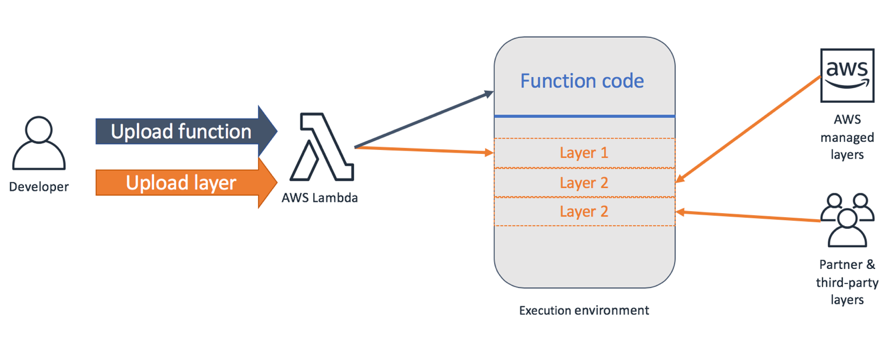
Lambda Layersfor reusable Code- Reuse common code across multiple functions.
- Examples:
- Logging packages for standardization.
- Custom version of the AWS SDK pinned to a tested version (e.g., Node.js, Python).
- Reduces duplication and simplifies function updates.
- Optimize Package Size and Dependencies
- Smaller Deployment Packages → Faster cold-start times.
- Remove unused libraries, documentation, and unnecessary files.
- For Java: Include only required AWS SDK modules.
- Good: Add only relevant dependencies (e.g.,
dynamodbmodule). - Bad: Avoid bundling the entire SDK.
- Good: Add only relevant dependencies (e.g.,
Monitor Concurrencyand SetCloudWatch Alarms- Concurrency Control: Prevent overwhelming downstream systems.
- Use CloudWatch Alarms for metrics like:
- ConcurrentExecutions.
- Invocations.
- Set up AWS Budgets for cost control to monitor daily expenses.
- Address unexpected spikes in traffic proactively.
- Optimize Memory and Timeout Settings
- Memory Allocation:
- Lambda scales compute power with memory.
Over-provision memory improves execution speedand reduces costs.- Benchmark to find the optimal memory-to-cost ratio for your use case.
- Timeout Settings:
- Do not over-provision timeouts.
- Set timeouts based on actual function performance to avoid unexpected costs.
- Memory Allocation:
3. Lambda@Edge vs AWS Lambda
Lambda@Edge and AWS Lambda (regular Lambda) are different services. Let me clarify this in detail:
- AWS Lambda: A serverless compute service where you can run functions in response to various events. You can trigger AWS Lambda functions from services like S3, DynamoDB, API Gateway, etc.
- Lambda@Edge: A variant of AWS Lambda that Runs closer to the end users at CloudFront edge locations. It allows you to perform lightweight processing at the edge, reducing latency and minimizing backend load.
Question - AWS Lambda concurrency limits
The engineering team at a football club built a notification system using Amazon SNS and AWS Lambda. During the off-season, the system handles 100 requests per second, but during peak season, it struggles with 5000 requests per second, causing missed notifications.
What is the best solution to address this issue?
Explanation: SNS to Lambda integrations are subject to AWS Lambda concurrency limits. If the rate of SNS messages increases (as in peak season), and the number of concurrent Lambda executions exceeds the account's concurrency quota, SNS may throttle or drop messages, resulting in missed notifications.
So, contacting AWS Support to increase the concurrency quota is a valid and often necessary step. Besides raising the limit, additional or alternative solutions may improve reliability and scalability:
Use SQS as a Buffer (Recommended Pattern)
Instead of invoking Lambda directly from SNS, you can:
- SNS → SQS → Lambda
- This decouples the system and lets SQS buffer bursts of messages during peak traffic, reducing pressure on Lambda concurrency.
- This is an AWS best practice for high-throughput systems.
Question - Dynamic image resizing using Lambda®Edge function
A social media company runs its application on Amazon EC2 instances behind an Application Load Balancer (ALB). The ALB is the origin for an Amazon CloudFront in the request distribution. The application has more than a billion images stored in an Amazon S3 bucket and processes thousands of images each second. The company wants to resize the images dynamically and serve appropriate formats to clients. Which solution will meet these requirements with the LEAST operational overhead?
- Use a Lambda®Edge function with an external image management library. Associate the Lambda®Edge function with the CloudFront behaviors that serve the images. (
Correct Ans) - Install an external image management library on an EC2 instance. Use the image management library to process the images.
- Create a CloudFront response headers policy. Use the policy to automatically resize images and to serve the appropriate format based on the User-Agent HTTP header in the request.
- Create a CloudFront origin request policy. Use the policy to automatically resize images and to serve the appropriate format based on the User-Agent HTTP header
Explanation
- Dynamic image resizing and format selection (e.g., WebP vs JPEG) requires on-the-fly processing based on headers like
User-Agent, which standard CloudFront configurations can't do alone. - Lambda@Edge runs at CloudFront edge locations, allowing:
- Dynamic image transformation (resize, format change)
- Low latency (processing happens close to the user)
- Minimal operational overhead (no EC2 to manage)
- External image libraries (e.g., Sharp or ImageMagick) can be bundled with the Lambda function to perform image processing.
Why the other options are incorrect?
- Install an external image management library on an EC2 instance:
- High operational overhead (you have to manage EC2, scaling, updates).
- Not cost-effective or scalable for image processing at large scale.
- Create a CloudFront response headers policy:
- Response header policies control HTTP headers, not image resizing or format conversion.
- Cannot modify image content.
- Create a CloudFront origin request policy:
- Origin request policies let CloudFront forward specific headers, cookies, and query strings to the origin.
- They do not handle image transformation.