AWS Directory Service — The Umbrella Service
AWS Directory Service is a collection of managed services that allow you to create, manage, and integrate directories in AWS. It helps you with user authentication and authorization across AWS services, just like Microsoft Active Directory does on-premises.
Under AWS Directory Service, there are several directory service options to choose from, based on your needs. One of them is AWS Managed Microsoft AD.
- What is Active Directory (AD)?
- AWS Directory Service Options
- Why Do We Need Active Directory (AD) at All?
- Why Did Microsoft Create Active Directory, But Apple Didn't?
- Directory in File Systems vs. Directory in Identity & Access Management
What is Active Directory (AD)?
Active Directory (AD) is a directory service developed by Microsoft that provides centralized management of users, computers, groups, and access permissions in a networked environment.
In simple terms
Active Directory is like a company-wide phone book and security gate. It stores information about every user, device, and resource in the organization and controls who can access what.
Key Features
- Centralized Authentication: Users log in once with a single username and password to access various systems.
- Authorization: Controls what users can access (e.g., folders, printers, applications).
- Group Policy Management: Automatically applies security and configuration settings to users or computers.
- Domain Services: Devices (like laptops and servers) become part of a centrally managed company network, where rules, access permissions, and security settings are controlled and enforced by Active Directory.
AWS Directory Service Options
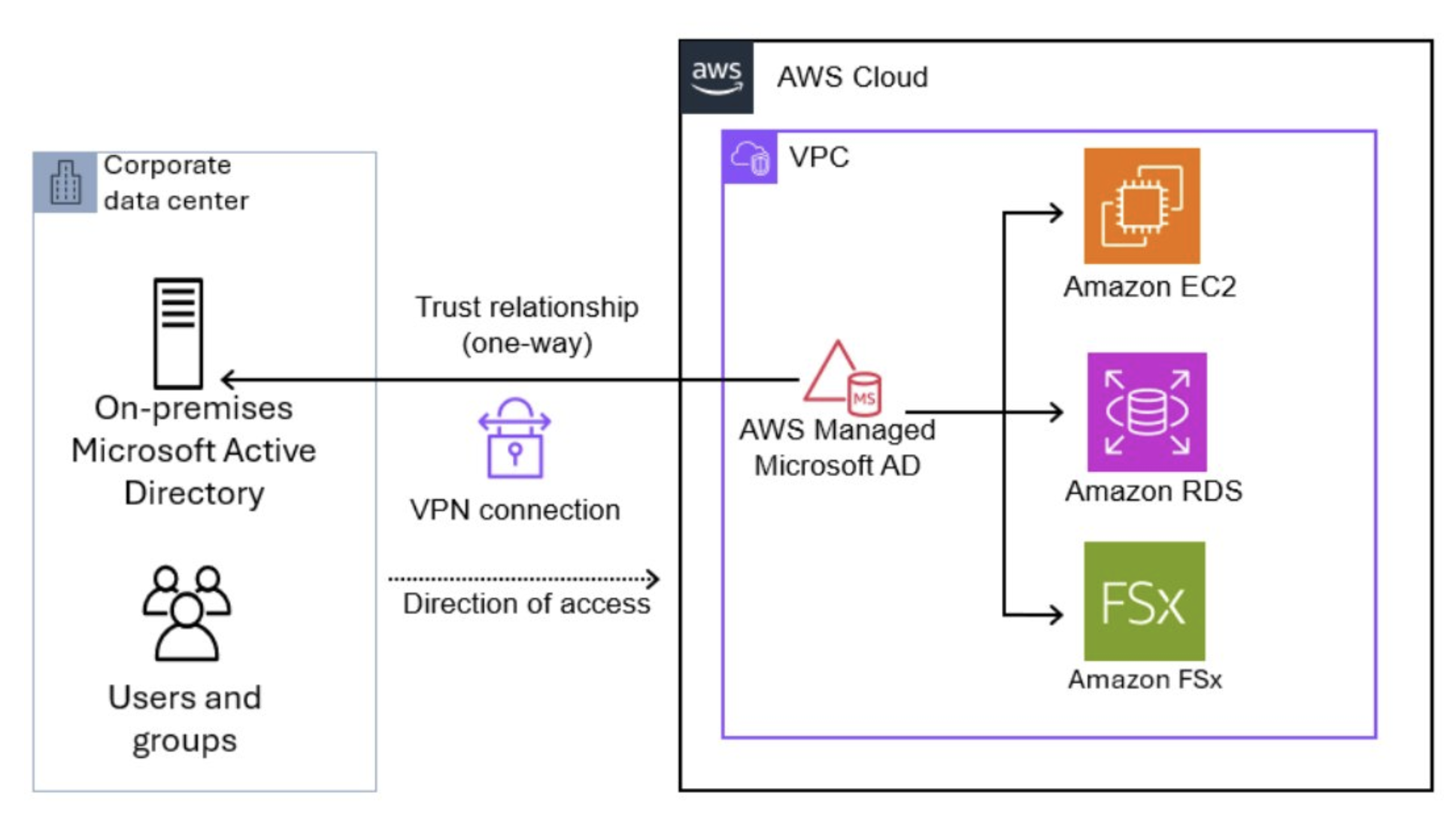
AWS Managed Microsoft Active Directory (AWS Managed AD)- Fully managed Microsoft Active Directory running in the cloud.
- Supports domain-join, Group Policy, Kerberos, LDAP, NTLM authentication.
- Ideal if you need to extend your on-premises AD to the cloud or need full Active Directory features (like GPOs, domain-join, etc.) for AWS-based resources.
- Best for organizations that rely on Active Directory and need it in the cloud (for applications like Amazon EC2, Amazon RDS, Amazon WorkSpaces, etc.).
Simple AD- A cost-effective, Microsoft AD-compatible directory for small to medium-sized businesses.
- Lighter than AWS Managed AD — doesn’t support advanced features like Group Policy or domain-join for Windows instances.
- Best for basic directory services or if you don’t need the full feature set of Microsoft AD.
AD Connector- It is a proxy service — it connects your AWS environment to your on-premises Microsoft Active Directory without having to copying/syncing users data to AWS.
- It authenticates users in AWS using your existing on-prem AD.
- It lets AWS services (like Amazon RDS, EC2, WorkSpaces, etc.) use your company’s internal AD usernames and passwords.
- Users
don’t need a separate AWS login— they log in with their regular domain credentials (existing AD users and groups). - Best for hybrid environments, where you want to extend on-premises AD functionality into the cloud.
Cloud Directory- A cloud-native directory service designed and developed by AWS for applications that need highly scalable directory management (like user profiles for apps or services).
- It’s not a full Active Directory but rather a flexible directory
service for cloud-native apps. - Best for applications needing directories that scale globally, such as social apps, IoT, or identity management.
Note:
- Kerberos is a network authentication protocol, primarily used to verify the identity of users and services on a network
- LDAP is a general-purpose protocol used by directory servers like Active Directory to provide authentication and directory lookups. AWS AD Connector is a proxy service from AWS Directory Service that allows AWS resources to use your on-prem Microsoft Active Directory for authentication — without copying any data to AWS.
Why Do We Need Active Directory (AD) at All?
Imagine a company with
- 100 employees:
- 10 printers
- 50 shared folders
- 3 levels of permission (HR, IT, Finance)
Without Active Directory, you would have to:
- Manually create users and passwords on every laptop
- Set access to files and printers for each user individually
- Handle password resets and account lockouts one by one
This becomes difficult and chaotic as the company grows.
Active Directory solves these problems by acting as a central system to manage users, devices, permissions, and security policies in one place.
Why Did Microsoft Create Active Directory, But Apple Didn't?
Microsoft and Active Directory:
Microsoft designed and built Windows Active Directory to meet the needs of large organizations. It provides key capabilities in a centralized, automated way that scales with company size. These capabilities include:
- Centralized login system for all users
- Controlled access to files, folders, printers, and applications
- Enforcement of security and compliance policies across devices and users
Windows was always intended for enterprise environments, so Microsoft prioritized building a system like Active Directory to support centralized management.
Apple and macOS:
macOS was originally designed for individual users such as developers, students, and creatives. Apple focused on simplicity, user experience, and local device control, rather than large-scale enterprise management.
As a result, Apple did not build a full enterprise directory service like Active Directory. Instead, Apple provided the flexibility for organizations to:
- Use third-party tools for central management
- Integrate macOS with Microsoft Active Directory or identity providers when needed
This approach allowed companies to bring Macs into enterprise environments without Apple needing to build and maintain a complex directory system like AD.
Directory in File Systems vs. Directory in Identity & Access Management
- Directory (in File Systems)
- A directory is a
logical concept that helps manage file storage systemwithin an operating system. - Also known as a folder, it organizes files hierarchically in the file system.
- Examples
/home/user/Documents(Linux/macOS)C:\Users\Admin\Documents(Windows)
- A directory is a
- Directory (in Identity & Access Management)
- In IT infrastructure, a directory is a centralized system that
stores and manages informationabout users, groups, devices, and access policies. - It functions like a user database for authentication and authorization.
- Stores:
- Usernames
- Password hashes
- Group memberships
- Device identities
- Policies and permissions
- Examples:
- Microsoft Active Directory (AD)
- AWS Managed Microsoft AD
- OpenLDAP
- Google Workspace Directory
- In IT infrastructure, a directory is a centralized system that