AWS IAM identity Center(formerly AWS SSO)
AWS IAM identity Center is a cloud-based service that allows you to centrally manage access to multiple AWS accounts and applications using single sign-on credentials. It can be integrated with AWS Organizations, IAM Identity Center, Active Directory, and external identity providers (like Okta, Azure AD) using SAML 2.0 or OIDC.
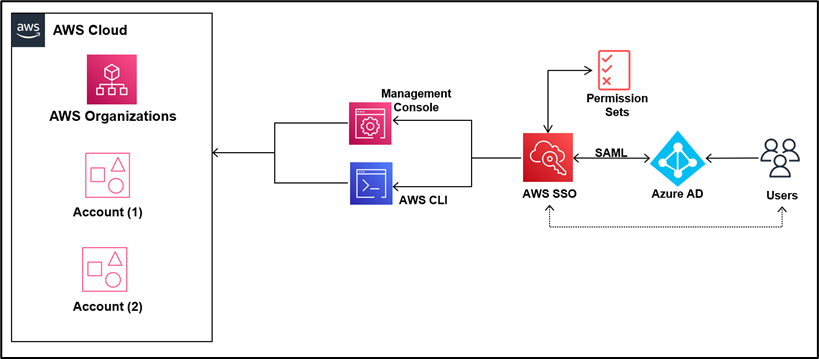
- Why can't users directly log in to the AWS Console and navigate between accounts?
- Steps to Enable IAM Identity Center (AWS SSO) and Grant Access
- AWS IAM Identity Center (AWS SSO) vs Amazon Cognito
- SAML and OIDC (OpenID Connect)
- Question - AWS SSO - One-way forest trust
Why can't users directly log in to the AWS Console and navigate between accounts?
When using AWS Organizations, each AWS account has its own set of credentials. Without centralized access, users must log in and out of each account separately, which is manual, error-prone, and inefficient.
How does AWS SSO (IAM Identity Center) help?
AWS SSO centralizes authentication for all AWS accounts and applications. Users log in once to the SSO portal and access everything they're authorized for.
Steps to Enable IAM Identity Center (AWS SSO) and Grant Access
Step 1: Enable IAM identity Center(formerly AWS SSO)

Step 2: Create or Add Users
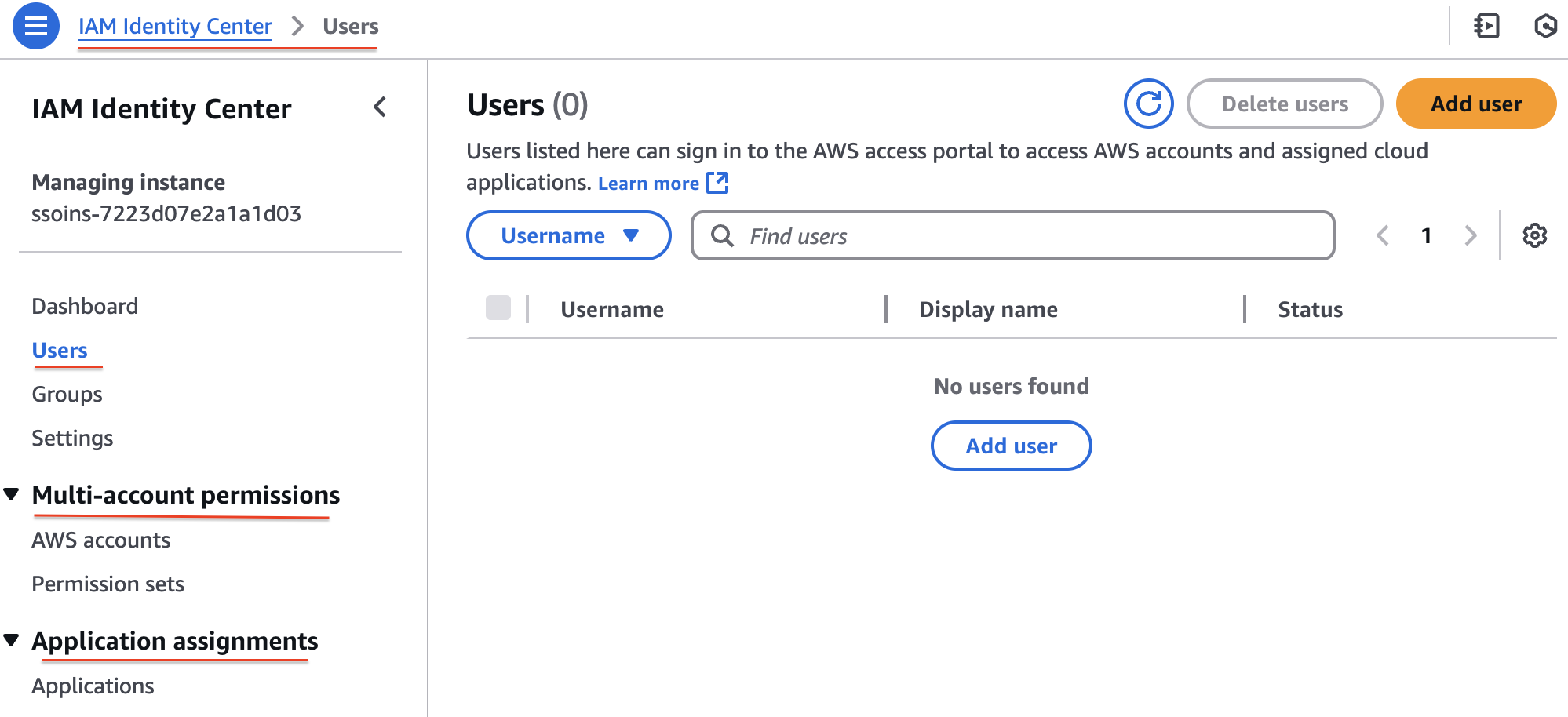
Step 3: Assign Users to AWS Accounts and/or Applications

Step 4: User Accepts Invitation and Accesses Assigned Accounts/Apps

AWS IAM Identity Center (AWS SSO) vs Amazon Cognito
AWS IAM Identity Center (AWS SSO): Used for centralized login to multiple AWS accounts and cloud apps by internal users. Supports integration with Active Directory, SAML 2.0 IdPs, and provides role-based access through a single sign-on portal.
Amazon Cognito: Used for authentication in customer-facing apps (web/mobile). Supports user sign-up, sign-in, social login, and integration with external IdPs. Manages millions of users and grants temporary AWS access via Identity Pools.
SAML & OIDC
SAML and OIDC (OpenID Connect) are both protocols used for Single Sign-On (SSO), but they differ in their design, use cases, and technical implementation.
IdP: An Identity Provider (IdP) is a trusted system that verifies the user's identity (e.g., using username/password, MFA, or biometrics) and issues authentication tokens (e.g., SAML assertions or OIDC ID tokens) to allow access to applications or services.
| Feature | SAML (Security Assertion Markup Language) | OIDC (OpenID Connect) |
|---|---|---|
| Protocol Type | XML-based | JSON-based (REST + OAuth 2.0 extension) |
| Transport | Browser redirects using HTTP POST (with XML payload) | RESTful APIs using JSON Web Tokens (JWTs) |
| Use Case Focus | Enterprise SSO (web-based apps, especially internal systems) | Modern app SSO (mobile apps, APIs, SPAs) |
| Token Format | SAML Assertion (XML) | ID Token (JWT - JSON Web Token) |
| Ease of Use | More complex, verbose | Simpler, modern, easier to parse |
| Common Providers | ADFS, Shibboleth, Okta, Ping Identity | Google, Facebook, Auth0, Amazon Cognito |
| Best For | Older enterprise systems, internal tools, legacy apps | Modern web/mobile applications, API security |
| Authentication Flow | Browser → IdP → SAML Assertion → App | App → IdP → ID Token (JWT) via OAuth 2.0 |
Question - AWS SSO - One-way forest trust
A company is migrating applications to AWS. The applications are deployed in different accounts. The company manages the accounts centrally by using AWS Organizations. The company's security team needs a single sign-on (SSO) solution across all the company's accounts. The company must continue managing the users and groups in its on-premises self-managed Microsoft Active Directory.
Which solution will meet these requirements?
- Enable AWS Single Sign-On (AWS SSO) from the AWS SSO console. Create a one-way forest trust or a one-way domain trust to connect the company's self-managed Microsoft Active Directory with AWS SSO by using AWS Directory Service for Microsoft Active Directory. (
Correct Ans) - Enable AWS Single Sign-On (AWS SSO) from the AWS SSO console. Create a two-way forest trust to connect the company's self-managed Microsoft Active Directory with AWS SSO by using AWS Directory Service for Microsoft Active Directory.
- Use AWS Directory Service. Create a two-way trust relationship with the company's self-managed Microsoft Active Directory.
- Deploy an identity provider (IdP) on premises. Enable AWS Single Sign-On (AWS SSO) from the AWS SSO console.
Explanation: The company -
- Wants SSO across multiple AWS accounts (via AWS Organizations),
- Manages users/groups in a self-managed on-premises Microsoft Active Directory.
To meet these needs:
- AWS SSO (now part of AWS IAM Identity Center) is the central service for SSO across multiple AWS accounts.
- AWS Directory Service for Microsoft Active Directory (AWS Managed Microsoft AD) is needed to establish a trust relationship between AWS and the on-prem AD.
- A one-way forest/domain trust from AWS Managed Microsoft AD to on-prem AD allows AWS SSO to authenticate users from the on-prem AD, without needing AWS to manage users.
Why the others are incorrect?
- Two-way trust is unnecessary and adds complexity and security exposure.
- "Use AWS Directory Service. Create a two-way trust..." — this option omits the critical step of enabling AWS SSO, and again, two-way trust isn't required.
- "Deploy an IdP on premises..." — this is a valid approach only if you're using SAML-based IdP, but here the requirement is for continued use of Microsoft AD, so AWS Managed Microsoft AD with trust is more appropriate.
When AD can act as IdP? Active Directory (AD) can act as an Identity Provider (IdP). Specifically, a self-managed Microsoft Active Directory can function as an IdP in scenarios where you integrate it with AWS for authentication, typically using SAML (Security Assertion Markup Language) or LDAP (Lightweight Directory Access Protocol) protocols.