Simple Storage Service(S3)
Amazon S3 is a simple key-value store designed to store an unlimited number of objects. These objects are stored in buckets, and each object can be up to 5 TB in size.
An object in Amazon S3 consists of the following:
- Key: The unique name to an object, used to retrieve it.
- Version ID: Within a bucket, a combination of key and version ID uniquely identifies an object.
- Value: The content being stored.
- Metadata: A set of name-value pairs used to store
additional informationabout the object. - Subresources: Used by Amazon S3 to store
object-specific additional information. - Access Control Information: Controls the access permissions for the object.
It’s important to note that metadata, which is included with the object, is not encrypted while stored in Amazon S3. Therefore, AWS recommends not placing sensitive information in S3 metadata.
1. S3 Standard Uploads
- Uploading data to S3 from the internet is free.
- No data transfer charges apply for uploading into S3, only charges for the storage of the object.
2. Improve file upload speed into Amazon S3
- S3 Transfer Acceleration (S3TA)
- S3TA improves transfer performance by routing traffic to the nearest edge location and using optimized Amazon CloudFront distribution paths to accelerate uploads.
- S3TA can speed up the upload and download of objects to and from S3 bucket, particularly when transferring large files over long distances.
- When S3TA is enabled, AWS charges additional fees($0.04/GB) for accelerated transfers.
- However, if S3TA does not result in an acceleration, AWS does not charge for S3TA.
- multipart uploads
- Multipart uploads allow large files to be split into smaller parts and uploaded in parallel, significantly speeding up the upload process.
- It is a cost-effective option that doesn't require additional network infrastructure.
- Use multi upload instead S3TA where
network has intermittent failures.
3. Speeding up uploads using Multipart Upload and S3 Transfer Acceleration together
- Multipart Upload: Breaks the file into smaller parts and uploads them in parallel, improving upload speed.
- S3 Transfer Acceleration: Optimizes the transfer speed by routing the data through AWS edge locations, ensuring faster uploads over long distances
Using these two features together allows you to take advantage of both parallel uploads (for efficiency) and faster routing (for speed)
4. Versioning
- Once Versioning is enabled on an S3 bucket, it can be suspended, but it cannot be permanently turned off. Suspending versioning means that no new versions of objects will be created for updates, but existing versions will still be retained.
5. Protection against accidental deletion of objects
- Versioning is a means of keeping multiple variants of an object in the same bucket. You can use versioning to preserve, retrieve, and restore every version of every object stored in your Amazon S3 bucket. Versioning-enabled buckets enable you to recover objects from accidental deletion or overwrite.
- MFA delete: To provide additional protection, enable multi-factor authentication (MFA) delete. MFA delete requires secondary authentication to take place before objects can be permanently deleted from an Amazon S3 bucket.
Question: Which set of Amazon S3 features helps to prevent and recover from accidental data loss? Ans: Enable the versioning and MFA Delete features on the S3 bucket.
6. Locking objects with Object Lock
Object Lock provides two mechanisms to manage object retention: retention periods and legal holds. Object Lock operates only in buckets with S3 Versioning enabled.
- Retention Periods
- A retention period specifies a
fixed duration during which an object remains locked and cannot be deletedor overwritten. - Retention periods can be applied to object versions either
explicitly or through a default settingat the bucket level. - When applied explicitly, a
Retain Until Dateis set for the specific object version, stored in its metadata, ensuring protection until the retention period expires.
- A retention period specifies a
- Legal Holds
- Legal holds
preventobjects from beingoverwritten or deleted. - Unlike retention periods, legal holds do not have a fixed expiration date and can be applied independently.
- Legal holds
- Retention Modes
- Compliance Mode:
- Provides the
highest level of protection. Prevents any user, including the root account, from modifying or deleting objects during the retention period.
- Provides the
- Governance Mode:
Protects objects from most usersbut allows authorized users with specific permissions (e.g.,s3:BypassGovernanceRetention) to modify retention settings or delete objects, if necessary.
- Compliance Mode:
- Version-Specific Protection
- Object Lock settings are
applied per object version. Different versions of the same object can have unique retention modes and durations, enabling granular control.
- Object Lock settings are
7. Transitioning objects using Amazon S3 Lifecycle
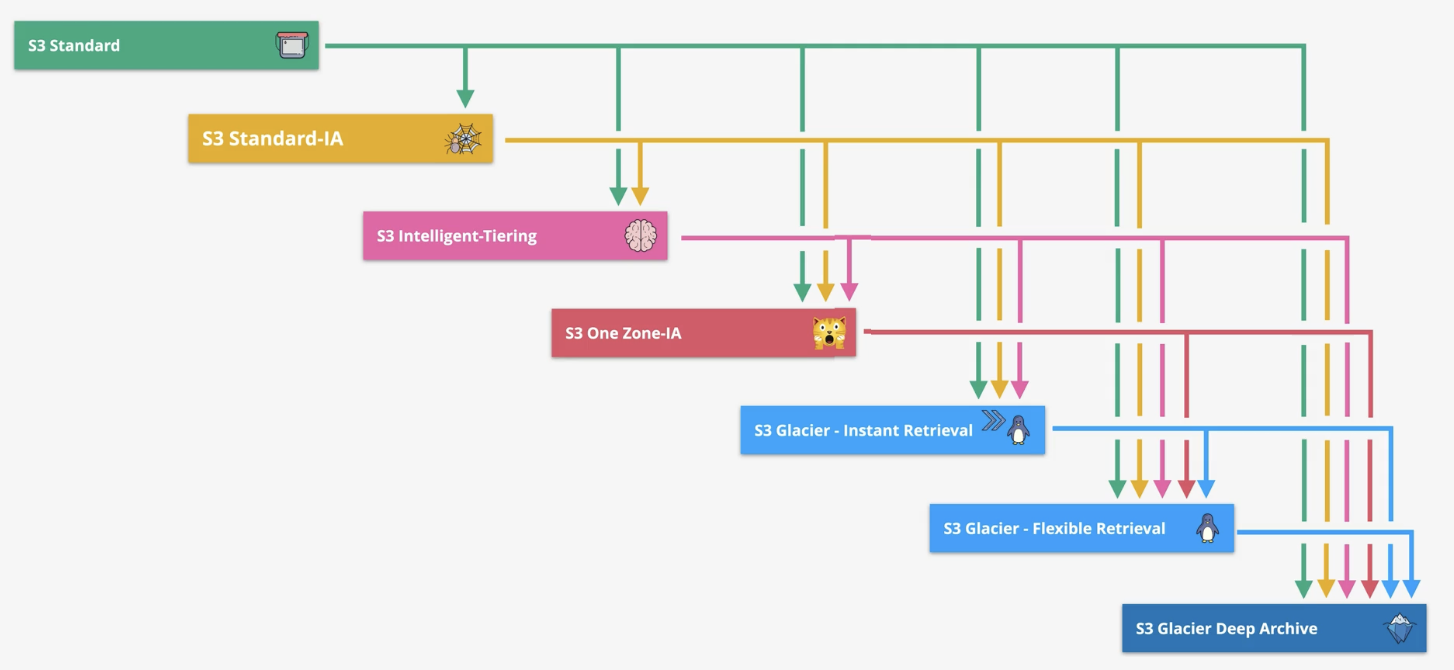
Amazon S3 supports a waterfall model for transitioning between storage classes, meaning that objects in S3 transition progressively from higher-cost to lower-cost storage classes as they age or are accessed less frequently. This transition flows in a downward direction, resembling a waterfall.
- Sequential Transitions: Objects move from more expensive storage classes to less expensive ones (e.g., S3 Standard → S3 Standard-IA(Infrequent Access) → S3 Glacier → S3 Glacier Deep Archive).
- No Reverse Flow: Objects cannot automatically move back to a higher-cost storage class. If needed, they must be restored or manually copied back to the desired storage class.
- S3 Intelligent-Tiering: Automatic Movement Across Tiers
- S3 Intelligent-Tiering lies in its automatic tiering capability, which sets it apart from the typical S3 lifecycle transitions.
- Unlike other storage classes, S3 Intelligent-Tiering automatically moves objects between its tiers based on access patterns, without requiring a predefined lifecycle rule.
- Lifecycle:
S3 Standard → S3 Standard-IA →S3 Intelligent-Tiering→ S3 One Zone-IA → S3 Glacier → S3 Glacier Deep Archive - Constraints and considerations for transitions
8. Constraints and considerations for transitions
- Objects Smaller Than 128 KB:
- Objects
smaller than 128 KB cannot be transitionedto any storage class by default due to high transition request costs. - You
can override this behaviorby adding an object size filter (ObjectSizeGreaterThanorObjectSizeLessThan) in the Lifecycle rule.
- Objects
- Minimum Storage Duration Before Transitioning
- Objects must must be first stored
in theS3 Standardstorage class for at least30 daysbefore transition objects to another storage class, such as S3 Standard-IA or S3 One Zone-IA or or S3 Glacier. - Non-current objects (in versioned buckets) must also be 30 days noncurrent before transitioning.
- Objects must must be first stored
- Charges for Transitioning Before Minimum Storage Duration:
- If an object is transitioned to another storage class before meeting the minimum storage duration of the current storage class, you will be charged for the full minimum duration.
- For example, if an object is stored in S3 Glacier Instant Retrieval, which has a 90-day minimum storage duration, and you transition it after 60 days, you will still incur charges for the remaining 30 days to fulfill the 90-day minimum requirement.
9. Choose storage classes
- S3 Standard-IA: Data that is accessed
less frequentlybut requiresrapid accesswhen needed. - S3 One Zone-IA: Data that can be
easily recreatedand is stored in a single availability zone. - S3 Glacier Instant Retrieval: Data that is rarely accessed but still needs to be retained, with retrieval times ranging from
minutes to hours. - S3 Glacier Flex Archive: Data that is rarely accessed but needs flexible retrieval times, offering a
balance between retrieval cost and speed. - S3 Glacier Deep Archive: Data that is rarely accessed (less than once per year) and can be retrieved with long retrieval times (
hours to days). - S3 Intelligent-Tiering: Data with unpredictable access patterns, automatically moving between frequent and infrequent access tiers.
10. S3 Prefix, Folder and delimiter
S3 automatically scales to handle high request rates. For instance, your application can achieve at least 3,500 PUT/COPY/POST/DELETE or 5,500 GET/HEAD requests per second per prefix in a bucket.
- There is No limits exist for the number of prefixes in a bucket.
- You can increase your read or write performance by
Parallelizing readsacross multiple prefixes. - For example, if creating 10 prefixes in a bucket to parallelize reads, then we can scale read performance to 55,000 read requests per second.
- S3 doesn’t have actual folders but simulates them using prefixes in the object keys.Each prefix will simulate a folder structure in S3
- Important keywords
- Bucket Name:
learnings3bucket24 - Prefix:
learning1/img/ - Delimiter:
/ - Folders:
learning1,img - Object:
s3img.png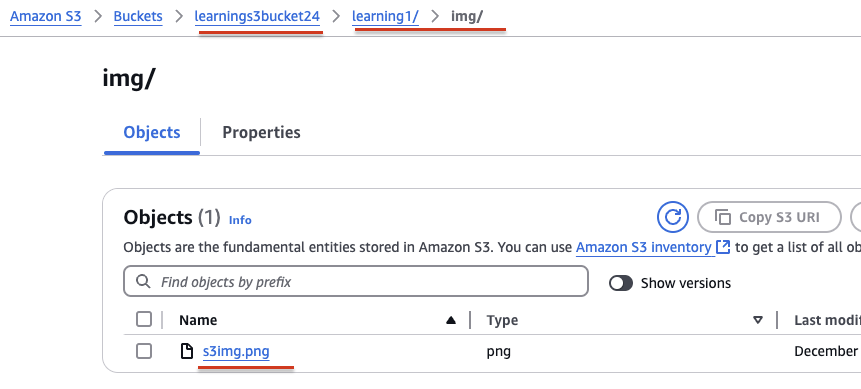
- Bucket Name:
11. Multipart upload
- se a multipart upload to
upload larger files, such as the large log files. - If transmission of any part fails, you can
retransmit that partwithout affecting other parts. - Best to use it where
network has intermittent failures.
s3-multi-region-access-points
12. What is S3 sync? When to use it?
The AWS S3 console is not suitable for copying very large volumes of data (such as terabytes or petabytes) between S3 buckets because it is slow, manual, and not designed for bulk data transfer. The console is recommended only for small to medium data volumes.
For large-scale or automated transfers, AWS provides the aws s3 sync command in the AWS CLI.
The aws s3 sync command is a powerful tool used to synchronize the contents of one location with another. It can sync:
- A local directory → S3 bucket
- S3 bucket → local directory
- One S3 bucket → another S3 bucket (same region or cross-region)
It is particularly useful when you need to copy a large amount of data or keep two locations continuously synchronized.
Basic Commands:
aws s3 sync s3://source-bucket s3://target-bucket

# --dryrun: Simulates the sync without making any changes, useful for testing.
aws s3 sync s3://source-bucket s3://target-bucket --dryrun

#--delete: Deletes objects in the target that are no longer present in the source.
aws s3 sync s3://source-bucket s3://target-bucket --delete
-
Key Features:
- The command compares objects based on Object existence and LastModified date
- Only the current version of the object is copied in a versioned bucket.
- By default, the
synccommand preserves object metadata.
-
Use Cases:
- Backup: Sync files from one bucket to another for backup purposes.
- Cross-Region Sync: Synchronize data between buckets in different AWS regions.
- Incremental Sync: Only copy new or updated objects, avoiding unnecessary duplication.
13. Amazon S3 Storage Class Latency (Low to High)
S3 Standard (<10 ms) < S3 Intelligent-Tiering (<10 ms) < S3 Standard-IA (<10 ms) < S3 One Zone-IA (<10 ms) < S3 Glacier Instant Retrieval (milliseconds) < S3 Glacier Flexible Retrieval (minutes to hours) < S3 Glacier Deep Archive (up to 12 hours).
14. S3 Object Encryption: Server-Side and Client-Side Options
In Amazon S3, encryption is applied at the object level, not at the bucket level. Each object (file) stored in the bucket is individually encrypted. You can enforce encryption at the bucket level by enabling a bucket policy or default encryption, which ensures all newly uploaded objects are encrypted. Enabling default encryption does not retroactively encrypt existing objects in the bucket.
- Server-Side Encryption (SSE):
- SSE-S3 (Server-Side Encryption with S3-Managed Keys):
- Amazon S3 handles both the encryption and decryption of the data automatically using its own keys.
- Encryption is done using AES-256 encryption. Example:
aws s3 cp file.txt s3://bucket-name/ --sse AES256
- SSE-KMS (Server-Side Encryption with AWS KMS):
- Uses keys managed by AWS KMS (either the default KMS key or a customer-managed KMS key).
- You have more control over key management, auditing, and
key rotation.
- SSE-C (Server-Side Encryption with Customer-Provided Keys):
- The customer provides their own encryption key during upload and download operations.
- Amazon S3 does not store the encryption key; it's the customer's responsibility to manage it securely.
- SSE-S3 (Server-Side Encryption with S3-Managed Keys):
- Client-Side Encryption:
- Client-Side Encryption with AWS KMS:
- The client encrypts data before uploading to S3 using AWS KMS-managed keys.
- The encryption keys are managed by AWS KMS.
- Client-Side Encryption with Customer-Provided Keys:
- The client is responsible for both encrypting data and managing the encryption key.
- The client provides the key when uploading and downloading data.
- Client-Side Encryption with AWS KMS:
15. Amazon S3 Website Endpoint Formats:
Amazon S3 website endpoints follow one of these two formats. These two formats depend on the AWS Region where the bucket is hosted.
- http://bucket-name.
s3-website.Region.amazonaws.com - http://bucket-name.
s3-website-Region.amazonaws.com
When you configure an Amazon S3 bucket for static website hosting, AWS assigns a Region-specific website endpoint to the bucket. Always ensure that the bucket name is at the start of the URL and the Region is properly placed based on the format (dash (-) or dot (.)).
16. Secure Data in S3 Object Storage with Immutability
Amazon S3 provides S3 Object Lock and S3 Glacier Vault Lock features to ensure that data cannot be altered or deleted for a specified duration. These features help organizations meet compliance requirements and protect critical data from accidental or malicious changes.
- S3 Object Lock
- Designed for Amazon S3 Standard and other storage classes like Standard-IA or Intelligent-Tiering.
- Implements Write Once, Read Many (WORM) protection at the object level.
- Ensures objects cannot be modified or deleted during the specified retention period.
- Not supported for Glacier or Glacier Deep Archive storage classes.
- Amazon S3 Glacier Vault Lock
- Specifically designed for Glacier storage classes (Glacier and Glacier Deep Archive).
- Provides WORM protection at the vault level (not individual objects).
- Once a vault lock policy is locked, it cannot be changed, ensuring compliance with stringent regulations (e.g., SEC 17a-4).
S3 Object Lock cannot be used directly on Amazon S3 Glacier storage classes. Use S3 Glacier Vault Lock for WORM protection in Glacier-based storage.
A vault is a logical container or group that holds a collection of S3 Glacier objects. It acts as a secure storage location where organizations can store large amounts of data in compliance with regulatory requirements.
In Glacier, vaults help ensure data can be managed securely, comply with regulatory requirements.
17. Access Control Lists and Bucket Policies
Access Control Lists (ACLs) and Bucket Policies are both used to control access to Amazon S3 resources, but they serve slightly different purposes:
- Access Control Lists (ACLs):
- ACLs define access permissions at the individual object or bucket level.
- Uses predefined groups identifiers (e.g.,
AuthenticatedUsers,AllUsers,Owner) - Best for simple, specific, object-level access control.
- Bucket Policies:
- Bucket Policies operate at the bucket level and can apply to all objects within that bucket.
- Uses JSON-based policies with resource-based access control, applying conditions like
AWS:SourceIP,aws:username,s3:prefix, etc. - Best for enforcing complex access policies across an entire bucket.
18. Amazon S3 Event Notifications and Destinations
Amazon S3's notification feature allows you to receive alerts when specific events occur in your bucket. To enable notifications, you need to configure:
- The events you want Amazon S3 to track and publish (e.g., object creation or deletion).
- The destination where the event notifications should be sent.
- Supported Notification Destinations:
- Amazon SNS Topics: Deliver notifications to subscribers.
Amazon Standard SQS Queues: Queue the events for processing.- Lambda Functions: Trigger serverless workflows.
- Important to Note on SQS Compatibility
- Standard SQS Queues: Supported as valid destinations for Amazon S3 event notifications.
FIFO SQS Queues:Not currently supported as destinationsfor Amazon S3 event notifications.
Note: In case of S3 event notifications, we can specify only one destination type (either to an AWS Lambda, SNS, EventBridge, etc.) for each event notification.
If we need to send two or more different notifications (for example, one to trigger AWS Lambda and another to trigger Amazon SageMaker Pipelines), EventBridge is the ideal solution because EventBridge allows multiple targets for a single event, making it highly flexible.
19. Amazon S3 Consistency
- Amazon S3 always returns the latest version of the object.
- S3 provides strong read-after-write consistency for GET, PUT, and LIST operations, ensuring immediate access to the latest data after a write.
- Strong read-after-write consistency ensures that once an object is written or modified, the next read immediately returns the most up-to-date version of the object.
- Strong consistency applies to list operations as well, providing an accurate reflection of objects in a bucket post-write.
- No changes to performance, availability, or regional isolation—delivered at no extra cost.
- Useful for applications requiring immediate reads and listings after writing objects.
20. Download and upload objects with presigned URLs
use pre-signed URLs to upload and download files from an AWS S3 bucket while keeping the bucket private.
21. S3 Multi-Region Access Points (MRAP)
Amazon S3 Multi-Region Access Points enable customers to access multiple Amazon S3 buckets located in different AWS Regions using a single global endpoint. This simplifies the architecture for globally distributed applications and improves performance, availability, and resilience.
How MRAP and CRR Work Together?
- Cross-Region Replication (CRR): Ensures data is copied and kept consistent across Regions
- Multi-Region Access Points (MRAP): Routes client requests to the
closest and healthiestRegion - Together: Enable a globally distributed, highly available S3 architecture
22. Question: S3- Intelligent-Tiering
A company stores user data in AWS. The data is used continuously with peak usage during business hours. Access patterns vary, with some data not being used for months at a time. A solutions architect must choose a cost-effective solution that maintains the highest level of durability while maintaining high availability. Which storage solution meets these requirements?
- Amazon S3 Intelligent-Tiering
- Amazon S3 One Zone-Infrequent Access (S3 One Zone-IA)
- Amazon S3 Glacier Deep Archive
- Amazon S3 Standard
23. Question: Server-side encryption with AWS KMS keys
A company is preparing to store confidential data in Amazon S3. For compliance reasons, the data must be encrypted at rest. Encryption key usage must be logged for auditing purposes. Keys must be rotated every year. Which solution meets these requirements and is the MOST operationally efficient?
- Server-side encryption with customer-provided keys (SSE-C)
- Server-side encryption with Amazon S3 managed keys (SSE-S3)
- Server-side encryption with AWS KMS keys (SSE-KMS) with manual rotation
- Server-side encryption with AWS KMS keys (SSE-KMS) with automatic rotation
24. Question: S3 Versioning and Object Lock
A company has a production web application in which users upload documents through a web interface or a mobile app. According to a new regulatory requirement. new documents cannot be modified or deleted after they are stored. What should a solutions architect do to meet this requirement?
- Store the uploaded documents in an Amazon S3 bucket with S3 Versioning and S3 Object Lock enabled.
- Store the uploaded documents in an Amazon S3 bucket. Configure an S3 Lifecycle policy to archive the documents periodically.
- Store the uploaded documents in an Amazon S3 bucket with S3 Versioning enabled. Configure an ACL to restrict all access to read-only.
- Store the uploaded documents on an Amazon Elastic File System (Amazon EFS) volume. Access the data by mounting the volume in read-only mode.
Explanation: Option 1 is correct because Object Lock ensures that objects stored in the S3 bucket cannot be deleted or overwritten for a specified retention period or indefinitely if "Legal Hold" is applied. Versioning tracks multiple versions of an object. When combined with Object Lock, it ensures that even if an object is uploaded with the same key, previous versions remain immutable.
Option 3 is incorrect because versioning tracks changes, configuring an ACL for read-only access does not guarantee data immutability.An administrator or authorized user could still delete objects or versions.
24. Question: Requester Pays feature on S3 bucket
A survey company has gathered data for several years from areas in the United States. The company hosts the data in an Amazon S3 bucket that is 3 TB in size and growing. The company has started to share the data with a European marketing firm that has S3 buckets. The company wants to ensure that its data transfer costs remain as low as possible. Which solution will meet these requirements?
- Configure the Requester Pays feature on the company's S3 bucket.
- Configure S3 Cross-Region Replication from the company's S3 bucket to one of the marketing firm's S3 buckets.
- Configure cross-account access for the marketing firm so that the marketing firm has access to the company's S3 bucket.
- Configure the company's S3 bucket to use S3 Intelligent-Tiering. Sync the S3 bucket to one of the marketing firm's S3 buckets.
Explanation: Option A is correct because By enabling the Requester Pays feature on the company's Amazon S3 bucket, the marketing firm (the requester) will pay for the data transfer and request costs when accessing the data. This approach minimizes the data transfer costs incurred by the company while still allowing the marketing firm access to the data.
Option B is incorrect because Cross-Region Replication is used to replicate data between buckets in different AWS regions. It does not reduce data transfer costs out of AWS—it only ensures data is replicated automatically between regions. The company would still bear the costs of transferring the data to the European marketing firm
24. Question: Multi-Region Access Points
A company runs its critical storage application in the AWS Cloud. The application uses Amazon S3 in two AWS Regions. The company wants the application to send remote user data to the nearest S3 bucket with no public network congestion. The company also wants the application to fail over with the least amount of management of Amazon S3.
Which solution will meet these requirements?
- Implement an active-active design between the two Regions. Configure the application to use the regional S3 endpoints closest to the user.
- Use an active-passive configuration with S3 Multi-Region Access Points. Create a global endpoint for each of the Regions.
- Send user data to the regional S3 endpoints closest to the user. Configure an S3 cross-account replication rule to keep the S3 buckets synchronized.
- Set up Amazon S3 to use Multi-Region Access Points in an active-active configuration with a single global endpoint. Configure S3 Cross-Region Replication.
Explanation option-wise:
- Requires the application to manage regional endpoint selection and does not provide automatic failover, increasing operational overhead.
- Incorrect because S3 Multi-Region Access Points use one single global endpoint, not separate endpoints per Region, and active-passive is unnecessary.
- Uses public regional endpoints and adds unnecessary cross-account replication, failing to provide optimized routing and low management overhead.
- S3 Multi-Region Access Points with Cross-Region Replication provide a single global endpoint with automatic nearest-Region routing, no public network congestion, and minimal management.