AWS Storage Gateway
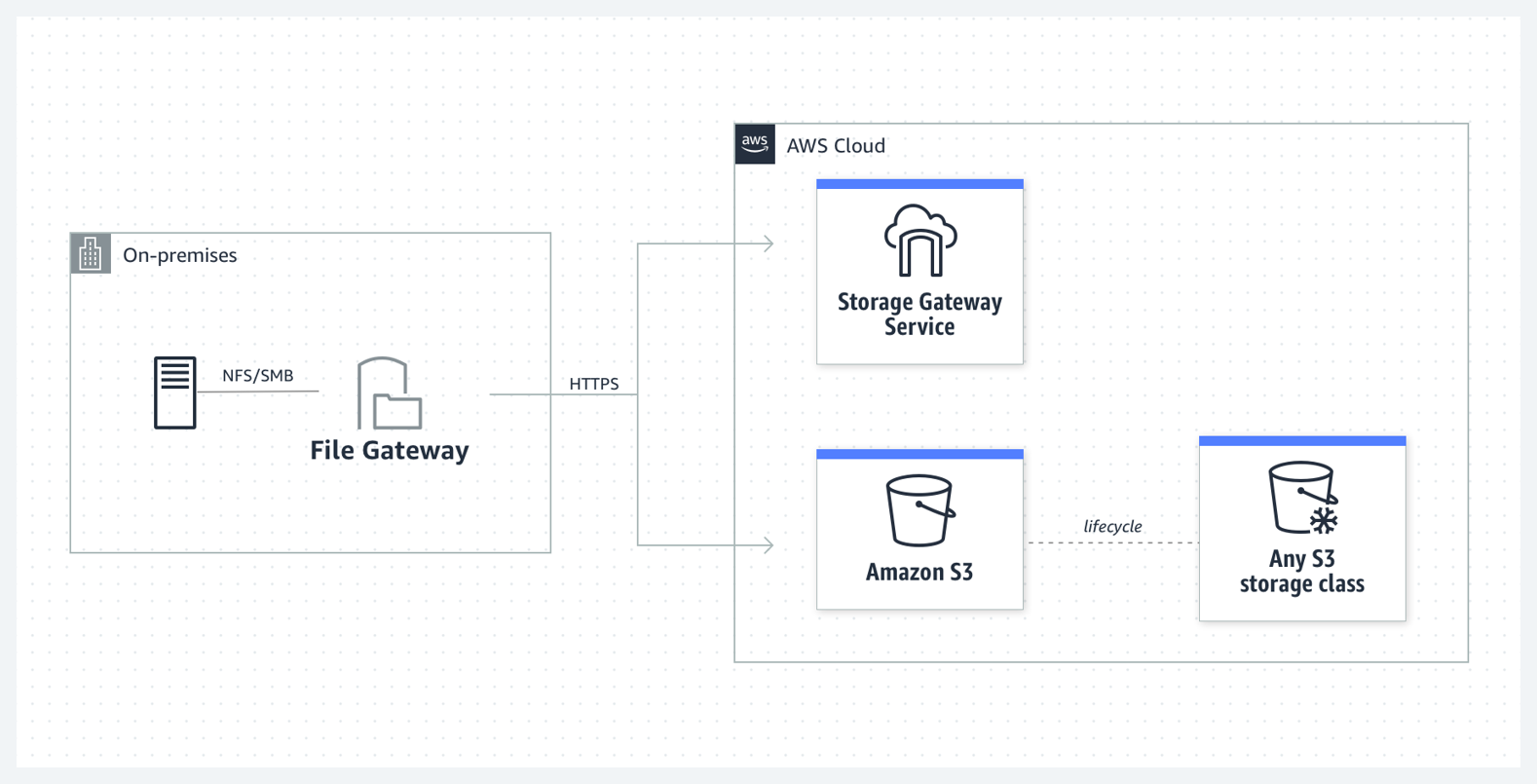
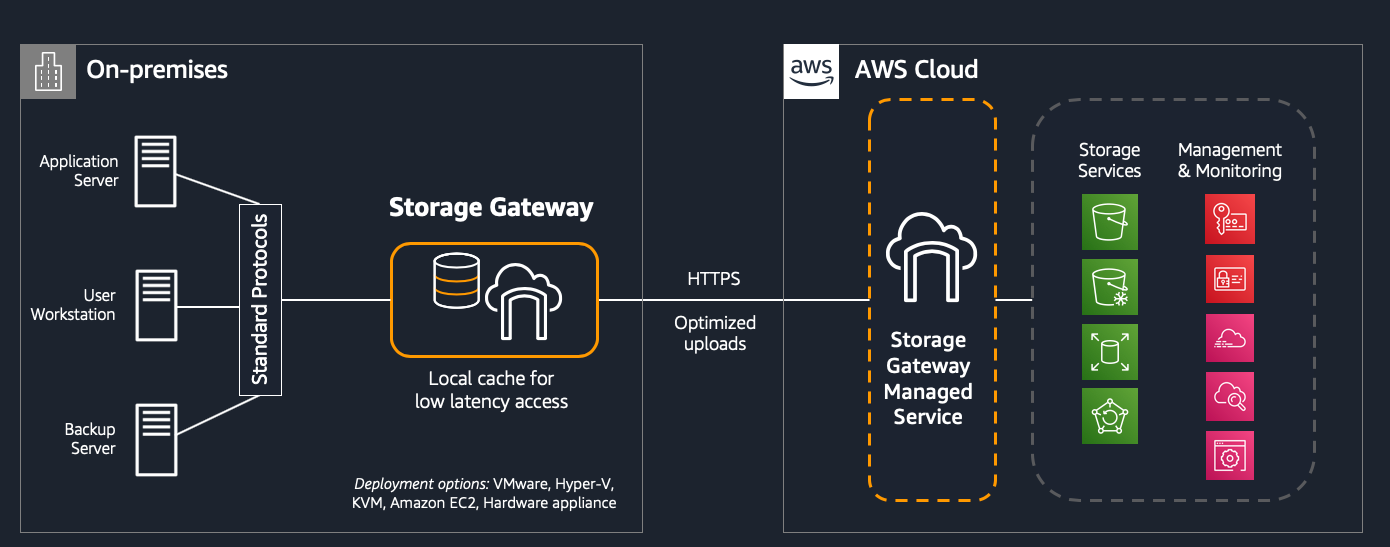
AWS Storage Gateway is a hybrid cloud storage service that enables on-premises applications to seamlessly access AWS cloud storage.
- Key Use Cases:
- Backup and Archival: Moving backups to AWS storage for durability and cost efficiency.
- File Sharing: Using file shares on-premises with AWS as the backend.
- Low-Latency Access: Providing low-latency access to AWS data by caching frequently accessed data locally.
- Supported Gateway Types:
- File Gateway: (Also known as S3 File Gateway) Bridges on-premises file storage with Amazon S3.
- FSx File Gateway: Provides on-premises access to Amazon FSx for Windows File Server.
- Volume Gateway: Offers block storage with backup to AWS using iSCSI.
- Tape Gateway: Migrates tape backups to the cloud with a virtual tape library (VTL).
1. Volume Gateway
- Uses the
iSCSI protocolto provideblock storageto your on-premises environment. - Does not use NFS or SMB protocols.
- It Offers two modes,
Volume StoredandVolume Cached. - Volume Stored Mode
Primary datais storedlocallyon-premises.- Data is asynchronously uploaded to AWS for backup or archival.
- Volume Cached Mode
Primary datais stored inAmazon S3.- Only frequently accessed data is cached locally for low-latency access.
2. S3 File Gateway
- Provides a
bridge between on-premises file storageandAmazon S3. - Supported Protocols
NFS: Commonly used in Linux environments.SMB: Primarily for Windows systems, with optional Active Directory integration.
- Use Case
- Files are stored locally for low-latency access and asynchronously uploaded to Amazon S3 as objects.
- Best for backup, archiving, and workloads that need access to data in S3 from on-premises.
3. FSx File Gateway
- Enables on-premises applications to access Amazon FSx for Windows File Server.
SMBis the Supported Protocol used to seamless access to Windows file shares.- Use Case:
- Provides low-latency access to FSx file shares for Windows-based workloads.
- Ideal for migrating Windows workloads to the cloud or supporting hybrid environments for legacy applications.
4. Tape Gateway
- Designed for migrating tape backups to the cloud.
- Does not support NFS interfaces.
- Features
- Provides a Virtual Tape Library (VTL) interface.
- Compatible with most backup software.
- Virtual tapes are stored in Amazon S3 or Amazon S3 Glacier for cost-effective archival storage.
5. NFS vs SMB Vs iSCSI Protocols
- iSCSI, NFS, and SMB protocols provide
access to storage resourcesvia a TCP/IP network. - While iSCSI provides
block device access, NFS and SMB arefile-level accessprotocols.
| Protocol | AWS Services | Use Case |
|---|---|---|
| NFS |
|
|
| SMB |
|
|
| iSCSI, Pronounced as eye-scuzzy |
|
|
6. Question S3 VPC gateway
A company runs a photo processing application that needs to frequently upload and download pictures from Amazon S3 buckets that are located in the same AWS Region. A solutions architect has noticed an increased cost in data transfer fees and needs to implement a solution to reduce these costs. How can the solutions architect meet this requirement?
- Deploy Amazon API Gateway into a public subnet and adjust the route table to route S3 calls through it.
- Deploy a NAT gateway into a public subnet and attach an endpoint policy that allows access to the S3 buckets.
- Deploy the application into a public subnet and allow it to route through an internet gateway to access the S3 buckets.
Deploy an S3 VPC gateway endpoint into the VPC and attach an endpoint policy that allows access to the S3 buckets.(Correct Ans)
Explanation: The correct answer is Option 1. Deploy an S3 VPC gateway endpoint into the VPC and attach an endpoint policy that allows access to the S3 buckets.
By deploying an S3 VPC gateway endpoint, the application can access the S3 buckets over a private network connection within the VPC, eliminating the need for data transfer over the internet. This can help reduce data transfer fees as well as improve the performance of the application. The endpoint policy can be used to specify which S3 buckets the application has access to.
Option 1, deploying Amazon API Gateway into a public subnet and adjusting the route table, would not address the issue of data transfer fees as the application would still be transferring data over the internet.
7. Question: Amazon FSx File Gateway on premises
A company has more than 5 TB of file data on Windows file servers that run on premises. Users and applications interact with the data each day. The company is moving its Windows workloads to AWS. As the company continues this process, the company requires access to AWS and on-premises file storage with minimum latency. The company needs a solution that minimizes operational overhead and requires no significant changes to the existing file access patterns. The company uses an AWS Site-to-Site VPN connection for connectivity to AWS. What should a solutions architect do to meet these requirements?
- Deploy and configure Amazon FSx for Windows File Server on AWS. Move the on-premises file data to FSx for Windows File Server. Reconfigure the workloads to use FSx for Windows File Server on AWS.
Deploy and configure Amazon FSx for Windows File Server on AWS.Deploy and configure an Amazon FSx File Gateway on premises. Move the on-premises file data to the FSx File Gateway. Configure the cloud workloads to use FSx for Windows File Server on AWS. Configure the on-premises workloads to use the FSx File Gateway. (Correct Ans)