AWS Organizations
AWS Organizations is a service that helps to centrally manage multiple AWS accounts and resources under one unified structure. It provides tools for governance, compliance, cost control, and access management.
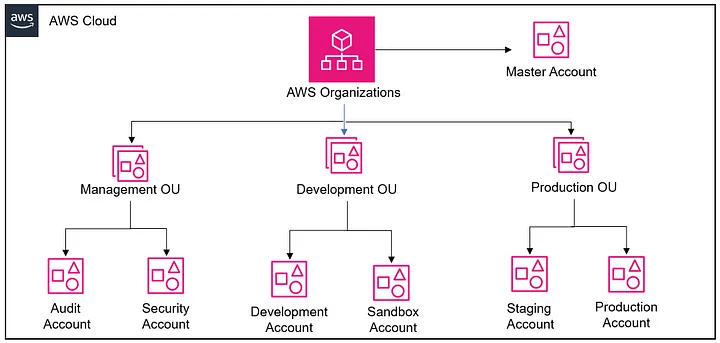
Key Components of AWS Organizations
- Master Account (Management Account):
- The first account created in AWS, also known as the Management Account.
- Has full control over the organization and manages all other accounts.
- Example: The Master Account controls permissions, billing, and overall management.
- Organizational Units (OUs):
- Groups of accounts organized by the company’s needs (e.g., by environment or team).
- Example: Separate OUs for Development, Staging, and Production.
- Accounts:
- Individual AWS accounts within the organization.
- Example: A Development Account and a Production Account.
- Users:
- People who access AWS resources, with different permissions.
- Example: A developer has access to the Development Account but not the Production Account.
- Policies:
- Define what actions users or accounts can perform.
- Example: A Security Account may only have read-only permissions.
- Roles:
- Temporary access to AWS resources with specific permissions.
- Example: A role for a deployment team to access EC2 instances during a deployment.
- Resources:
- AWS services like EC2, S3, RDS, etc., that are created and managed within accounts.
- Example: A Development Account may have a staging EC2 instance for testing.
- Root User:
- The original user created in an AWS account, with full access to everything.
- Example: The Root User sets up the account and manages critical resources