AWS ACL (Access Control List)
An Access Control List (ACL) in AWS is a set of rules that define permissions for accessing resources within specific AWS services.
AWS provides different types of ACLs depending on the service.In practice, ACLs in AWS are primarily used in:
- Amazon VPC as Network ACLs (NACLs) to control subnet-level traffic
- Amazon S3 as Access Control Lists to manage access to buckets and objects
- AWS WAF as Web ACLs to filter and control web requests
- VPC Network ACLs (NACLs)
- S3 ACLs
- AWS WAF Web ACLs
- Difference between Security Groups and NACL
- EFS Access Control (Access Points and POSIX ACLs)
- Exam Question
1. VPC Network ACLs (NACLs)
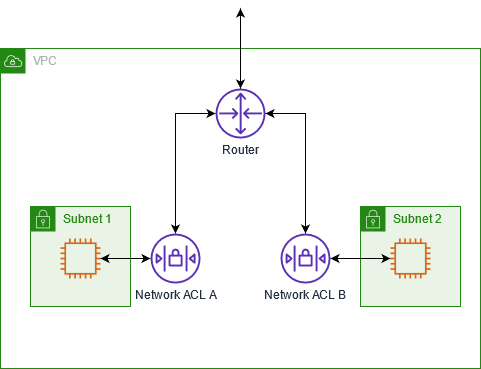
Control inbound and outbound traffic to and from subnets in a VPC.
- It operates at Layer 3 (Network) and Layer 4 (Transport)
- There are two Types of it.
- Inbound ACL: Specifies which traffic can enter the subnet.
- Outbound ACL: Specifies which traffic can leave the subnet.:
- Key Features
- Stateless: Each request is evaluated individually, so responses must also be explicitly allowed.
- Rule Order: Rules are evaluated in the order they are listed, and the first matching rule is applied.
- When to Use
- Use VPC NACLs for controlling network traffic at the subnet level, especially for use cases where stateless filtering is required, or to provide an additional layer of security for your VPC.
2. S3 ACLs
There are two main types of ACLs to control access to Amazon S3 buckets and objects:
- Bucket ACLs – Specify permissions for the S3 bucket itself.
- Object ACLs – Specify permissions for individual objects within a bucket.
3. AWS WAF Web ACLs
Control and filter HTTP and HTTPS requests to web applications.
- Operates at Layer 7 (Application layer)
- Supports allow, block, and count actions
- Can filter traffic based on: IP addresses, HTTP headers, URI strings and SQL injection and XSS patterns
When to Use
- To protect web applications from common web attacks
- To block malicious IPs or bots
- To implement rate limiting and request filtering
4. Difference between Security Groups and NACL
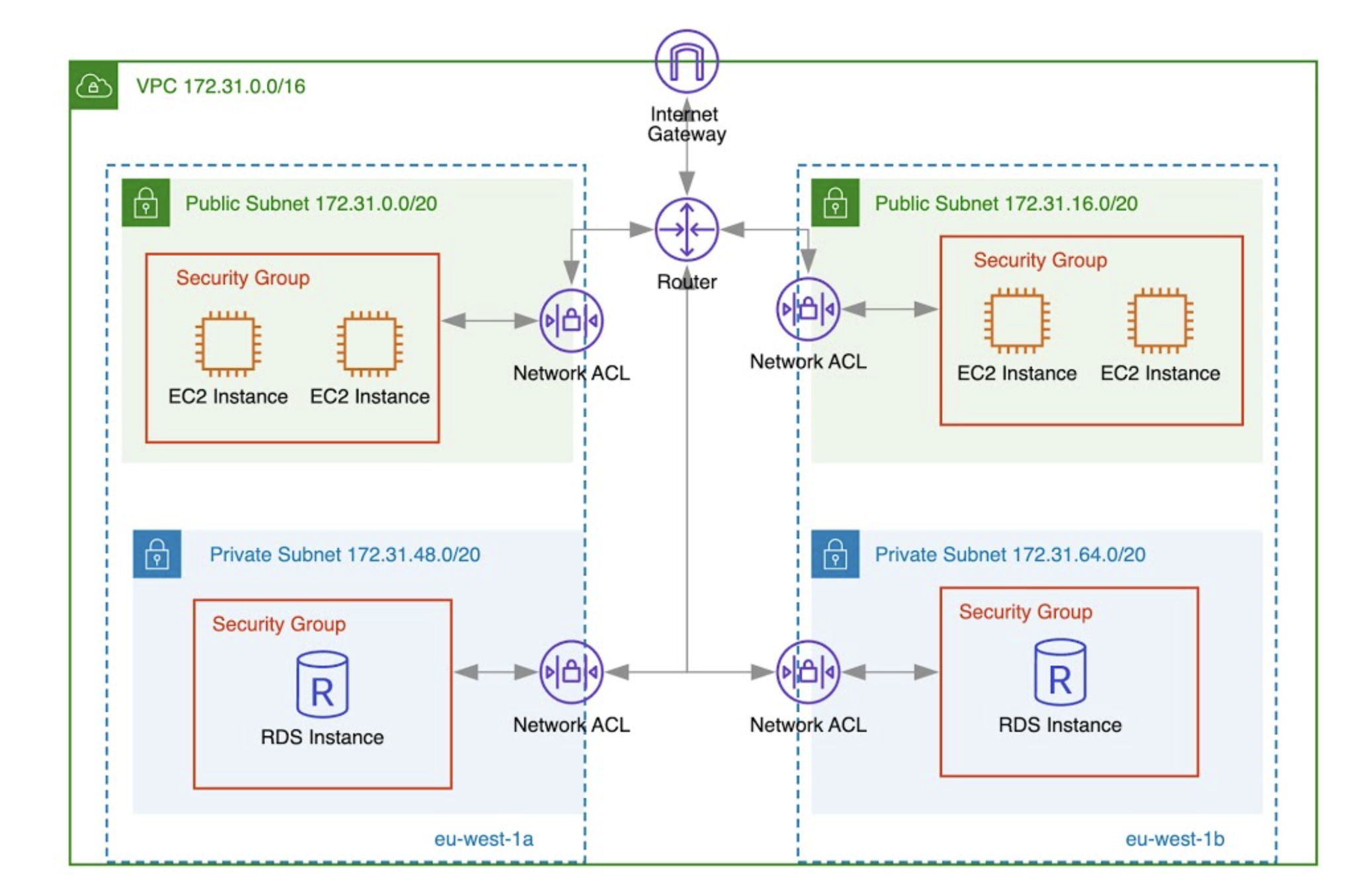
In AWS VPC, Security Groups and Network ACLs
- Both act as
virtual firewalls. - Both operate at Layer 3 (Network Layer) and Layer 4 (Transport Layer) of the OSI model. They filter traffic based on IP addresses (Layer 3) and ports/protocols (Layer 4).
- Security Groups
- Security Groups operate at the
instance leveland arestateful, which means if inbound traffic is allowed, the return traffic is automatically allowed. - They support allow rules only, and all rules are evaluated together, instead in order.
- Because of this simplicity and flexibility, Security Groups are the primary and recommended way to control access to EC2 instances.
- Security Groups operate at the
- Network ACL
- Network ACLs operate at the
subnet leveland arestateless, which means you must explicitly allow both inbound and outbound traffic. NACLs support both allow and deny rules, and rules are processed sequentially based on rule number. NACLs act as the first line of defenseby filtering traffic at the subnet boundary before it reaches the instances and their Security Groups.
- Network ACLs operate at the
In practice, Security Groups are used for fine-grained instance protection, while NACLs are used for broad, subnet-level controls. Together, they provide layered security in a VPC.
5. EFS Access Control
Amazon EFS access can be controlled using two main mechanisms:
- POSIX ACLs – traditional file system permissions for files and directories, based on users and groups.
- EFS Access Points – entry points into an EFS file system with enforced permissions and user/group context.
6.Question
A company runs multiple applications on Amazon EC2 instances in a VPC. Application A runs in a private subnet that has a custom route table and network ACL. Application B runs in a second private subnet in the same VPC.
The company needs to prevent Application A from sending traffic to Application B.
Which solution will meet this requirement?
- Add a deny outbound rule to a security group that is associated with Application A. Configure the rule to prevent Application B from sending traffic to Application A.
- Add a deny outbound rule to a security group that is associated with Application A. Configure the rule to prevent Application A from sending traffic to Application B.
- Add a deny outbound rule to the custom network ACL for the Application B subnet. Configure the rule to prevent Application B from sending traffic to IP addresses that are associated with the Application A subnet.
- Add a deny outbound rule to the custom network ACL for the Application A subnet. Configure the rule to prevent Application A from sending traffic to IP addresses that are associated with the Application B subnet.
Answer: 4
Explanation:
- Security groups cannot have deny rules and are stateful, so options A and B are invalid.
- Network ACLs are stateless and support deny rules, making them suitable for explicitly blocking traffic.
- Option 3 denies outbound traffic from Application B, which is the wrong direction. The requirement is not about stopping B → A, but A → B.
- Adding the deny rule on the Application A subnet effectively prevents traffic from leaving Application A toward Application B, meeting the requirement.