AWS Route 53
Amazon Route 53 is a highly available and scalable Authoritative Domain Name System (DNS), designed to register domains, route end-user requests to internet applications hosted on AWS or elsewhere, and perform health checking.
Use Amazon Route 53 based geolocation routing policy to restrict distribution of content to only the locations in which you have distribution rights
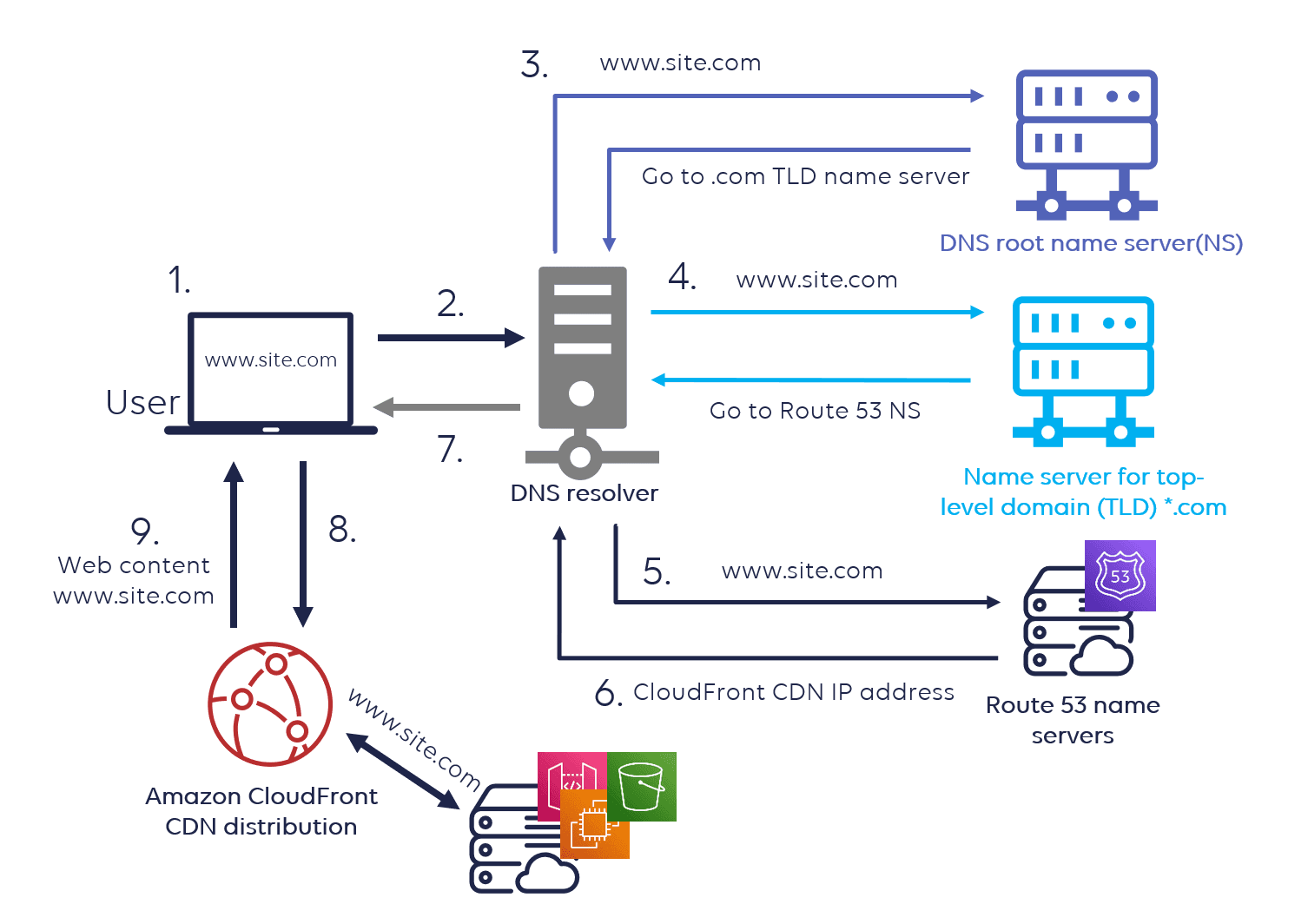
1. Domain Name System (DNS) and Authoritative DNS Servers
- The Domain Name System (DNS) is a
distributed databasethat translates human-readable domain names (e.g.,www.example.com) into IP addresses (e.g.,192.0.2.1), enabling the routing of internet traffic. - An authoritative DNS server is a type of DNS server that
stores the actual DNS records for a domainand provides definitive, authoritative answers to queries about those records, serving as the source of truth for the domain's DNS data.
2. Route 53 Key Features
- Domain Registration: Allows to register new domain names or transfer existing ones.
- DNS Management: Translates human-readable domain names to IP addresses for routing internet traffic.
- High Reliability: Built for millions of requests per second with a global network for low latency and high availability.
- Routing Policies: Supports various strategies for routing traffic:
- Simple Routing
- Failover Routing
- Latency-based Routing
- Geolocation Routing
- Weighted Routing
- Multi-value Answers Routing
- Health Checks & Monitoring: Monitors resources like EC2 instances and routes traffic only to healthy endpoints.
- Private DNS: Supports DNS resolution within a VPC via Private Hosted Zones.
- Integration with AWS Services: Seamless integration with services like CloudFront, ELB, and S3 for optimized traffic routing.
- Hybrid DNS Solutions for on-premises and cloud environments.
3. Route 53 Hosted Zone
A Route 53 Hosted Zone is a container for DNS records associated with a specific domain (e.g., example.com).
- It is a
globally resilientDNS database, hosted across multiple DNS servers to ensure high availability. - Hosted zones can be created either through domain registration via Route 53 or separately for custom domains.
- These zones
store DNS recordssuch as A, AAAA, MX, NS, and TXT records, which define how traffic should be routed for the domain. - Route 53 hosted zones are
authoritative for the domain they represent.
Types of Hosted Zones:
- Public Hosted Zone: Manages DNS records for domains accessible over the public internet.
- Private Hosted Zone: Manages DNS records that are only accessible within a specified Virtual Private Cloud (VPC).

4. DNS Records in Route 53
DNS records are the fundamental building blocks in Route 53 for managing domain names. Common types of DNS records include:
ARecord (Address Record):Astands forAddress. Maps a domain name to an IP Address(IPv4). Ex- example.com >255.255.255.0.AAAARecord:AAAAstands forQuad Addressfour times(128bits) the size of IPv4 addresses(32 Bits). Maps a domain name to anIPv6address. Ex- example.com >2001:0db8:85a3:0000:0000:8a2e:0370:7334.CNAMERecord (Canonical Name): Maps one domain name (www.your-domain.com) to another domain name (yourapp.provider.com) or subdomain (test.your-domain.com).MXRecord (Mail Exchange): Directs email traffic to the correctmail servers.TXTRecord: Holdstext-based information, commonly used forverification or securitypurposes (e.g., SPF records).PTRRecord: A Pointer (PTR) record resolves anIP address to a fully-qualified domain name(FQDN) as anopposite to what A record does.AliasRecord: Map domain toselected AWS resources, such as Amazon CloudFront distributions and Amazon S3 buckets.NSRecord (Name Server): Specifiesauthoritative DNS serversfor a domain.
These records allow Route 53 to control traffic routing and domain management effectively.
5. Understanding A and AAAA DNS Records
When both A (IPv4) and AAAA (IPv6) records are present for a domain like clearfunda.com in a public hosted zone, the resolver will return both IP addresses (IPv4 and IPv6), assuming the client requesting the domain can handle both protocols. Example:
Let’s say you have the following DNS records in your public hosted zone for clearfunda.com:
-
A Record:
clearfunda.com→192.0.2.1(IPv4 address) -
AAAA Record:
clearfunda.com→2001:0db8:85a3:0000:0000:8a2e:0370:7334(IPv6 address)How DNS Resolution Works:
- When a client requests
clearfunda.com, the DNS resolver first checks for available records. - The resolver will return both the A (IPv4) and AAAA (IPv6) records to the client, if the client supports both protocols.
- IPv6-capable clients will attempt to connect using the
AAAA(IPv6) address first. - If the client cannot use IPv6 (e.g., it’s an IPv4-only device), it will fall back to the
A(IPv4) address.
- When a client requests
6. Understanding the Difference Between www and www.example.com in DNS A Records
- WWW: is a relative record, and by default, it is interpreted as
www.example.comwhen it's part of theexample.comzone. - WWW.EXAMPLE.COM: is a fully qualified record, directly referencing the FQDN.
Usage: www is typically used for DNS configuration in a domain's zone file, while www.example.com is a specific target for DNS records.
Record Resolution: If you define both www and www.example.com as A records, they can point to different IP addresses (or the same), but they are distinct entries for the DNS resolver.
www IN A 192.0.2.1

www.example.com IN A 192.0.2.1
7. Zone Apex (Top Node)
The top node of a DNS namespace, also known as the zone apex, refers to the root of a specific DNS zone. For each hosted zone you create in Route 53, there is exactly one top node, which corresponds to the DNS name of the hosted zone itself.
- If you create a hosted zone for
example.com, the zone apex isexample.com. - If you create a hosted zone for
sub.example.com, the zone apex issub.example.com. - There is only one zone apex per hosted zone, regardless of how many records exist within that zone.
- Examples:
- For a hosted zone
example.com, the top node isexample.com. - For a hosted zone
myapp.example.com, the top node ismyapp.example.com.
- For a hosted zone
In summary, the number of top nodes in AWS Route 53 equals the number of hosted zones you've created.
8. Routing Policies
- Simple Routing: Routes traffic to a single resource, ideal for basic setups like a web server (e.g., example.com).
FailoverRouting: Enables active-passive failover, ensuring high availability.GeolocationRouting: Routes traffic based onuser location. Useful for region-specific content.GeoproximityRouting: Routes traffic to theclosest AWS Regionbased on the geographic location of the user and defined bias (you can set a bias to prioritize one region over another).- Latency Routing: Directs traffic
to the AWS Regionwith the lowest latency. IP-BasedRouting: Routes traffic based on the IP address origin of users.- Multivalue Answer Routing: Returns up to 8 healthy records randomly, useful for load balancing.
- Weighted Routing: Distributes traffic to resources based on weights you define, ideal for traffic proportioning.
Note:: Active-Passive Failover means that one resource is designated as "active", handling all traffic during normal operations, while another resource remains "passive" (or on standby). The passive resource only takes over if the active one becomes unhealthy or unavailable.
9. Geolocation Routing vs Geoproximity Routing
1. Geolocation Routing
- Routes traffic based on the exact geographic location of the user — such as country, state, or continent.
- Static configuration: You cannot adjust or shift the geographic boundaries dynamically.
- Not suitable when you want to dynamically expand or shrink the area from which traffic is routed.
- Use Case: All users from India go to Server A, and users from the US go to Server B.
2. Geoproximity Routing (Only available via Route 53 Traffic Flow)
- Routes traffic based on the geographic proximity of the user to AWS resources (like an EC2 instance or ELB).
- Dynamic control: You can adjust the size of the routing region by applying a bias.
- Positive bias → expands traffic region.
- Negative bias → shrinks traffic region.
- Ideal for load distribution or shifting traffic gradually between AWS regions.
10. UDP Support and Handling DNS Failover
Route 53 supports UDP
- Route 53 fully supports both UDP and TCP for transport protocol for DNS globally.
- UDP (User Datagram Protocol) is the default transport protocol used for DNS queries.
- Standard DNS queries (A, AAAA, CNAME, etc.) are typically served over UDP on port 53.
- TCP is used as a fallback when responses are too large for a single UDP packet or for DNS zone transfers.
DNS Failover with Route 53
- Route 53 can perform DNS-based failover using health checks.
- You can associate health checks with primary and secondary records (e.g., active-passive failover).
- If the primary endpoint becomes unhealthy, Route 53 routes traffic to a healthy backup.
Primary and Secondary records
- Primary DNS Record -
example.com → 192.0.2.10(main web server) - Secondary DNS Record -
example.com → 192.0.2.20(backup server). This one is marked as a failover record.
11. Integration with Global Accelerator and CloudFront
Route 53 can route requests to either AWS Global Accelerator or CloudFront, depending on application's architecture and requirements.
- Route 53 can be used to direct traffic to AWS Global Accelerator when your application requires low latency, automatic failover, and performance optimization across multiple AWS regions. Global Accelerator supports HTTP, HTTPS, TCP, and UDP protocols.
- Route 53 is also used to route traffic to Amazon CloudFront for content delivery, caching, and low-latency access to static or dynamic web content. CloudFront supports HTTP and HTTPS protocols.
- Beyond these integrations, Route 53 can route traffic to a wide range of AWS and non-AWS resources, including -
- EC2 instances
- Load balancers (ALB/NLB)
- S3 static websites
- On-prem servers (via IP)
- API Gateway endpoints
- External endpoints
12. Multi-layer Failover Strategies
Problem:
What if your application is running fine on Amazon EC2, but:
- The Elastic Load Balancer (ELB) itself isn’t reachable?
- The ELB and EC2 instances are healthy, but a bug in your application code causes the app to crash?
- The EC2 instances in one Availability Zone of a multi-AZ ELB are experiencing issues?
Solution
Use Amazon Route 53 with a Failover Routing Policy to route traffic to an alternate region or backup resource if the primary ELB becomes unreachable. Route 53 uses a combination of mechanisms to determine the health of the ELB and the application behind it:
- ELB Node Health: Route 53 can perform health checks directly on individual ELB endpoints to ensure the load balancer is operational.
- Instance Health via ELB: Route 53 leverages the ELB's internal health checks to evaluate backend EC2 instance health. If all instances in the ELB fail their checks, the ELB is considered unhealthy.
- Failover Routing: If the ELB or application fails health checks, Route 53 automatically reroutes traffic to a predefined secondary (passive) resource, such as:
- Another region’s ELB
- A static S3-hosted backup website
- An on-premises IP endpoint
Note: Route 53 health checks typically monitor higher-level endpoints, such as:
- The DNS name of an ELB
- IP addresses
- Application URLs (e.g.,
/healthcheck)
It does not directly monitor internal application logic or individual EC2 instances unless configured explicitly.
13. Route 53 Question Example
Question 1: A social media company wants the capability to dynamically alter the size of a geographic area from which traffic is routed to a specific server resource. Which feature of Amazon Route 53 can help achieve this functionality?
Ans: Geoproximity
Explanation:
Geoproximity Routing allows to:
- Route traffic based on the geographic location of your users and resources (e.g., AWS Regions or IP ranges).
- Shift traffic between regions by adjusting a bias value to expand or shrink the size of the geographic region that routes to a resource.
14. Route 53 Question Example
A company has migrated its application from a monolith architecture to a microservices based architecture. The development team has updated the Amazon Route 53 simple record to point "myapp.mydomain.com" from the old Load Balancer to the new one.
The users are still not redirected to the new Load Balancer. What has gone wrong in the configuration?
- The health checks are failing
- The Time To Live (TTL) is still in effect
- The CNAME Record is misconfigured
- The Alias Record is misconfigured
Ans: The Time To Live (TTL) is still in effect.
Explanation:
In Amazon Route 53, every DNS record has a Time To Live (TTL) value, which tells DNS resolvers how long they can cache the record before checking Route 53 again for updates.
So, even if the development team updated the Route 53 record to point myapp.mydomain.com to the new Load Balancer:
- If the old TTL value was, say, 300 seconds (5 minutes) or more,
- DNS resolvers (including user browsers and ISPs) may still be using the cached IP of the old Load Balancer,
- Which means users will continue being routed to the old infrastructure until that TTL expires.