VPC
1. Network ACL
The Network ACL (NACL) acts as a stateless firewall that is attached within a VPC and operates at the subnet level, managing both inbound and outbound traffic within a VPC.
- A single NACL can be associated with multiple subnets, allowing you to apply the same set of rules across several subnets.
- However, each subnet in a VPC can only be associated with one NACL at a time. If you associate a new NACL with a subnet, the previous NACL is automatically disassociated.
- By default, new subnets are automatically associated with the Default NACL, which allows all inbound and outbound traffic until it is manually modified.
- You can create and assign a custom NACL to define specific rules for controlling traffic. This allows for more granular control over what traffic is allowed or denied at the subnet level.
This setup makes NACLs useful for subnet-level traffic filtering, separate from instance-level access control, which is handled by Security Groups.
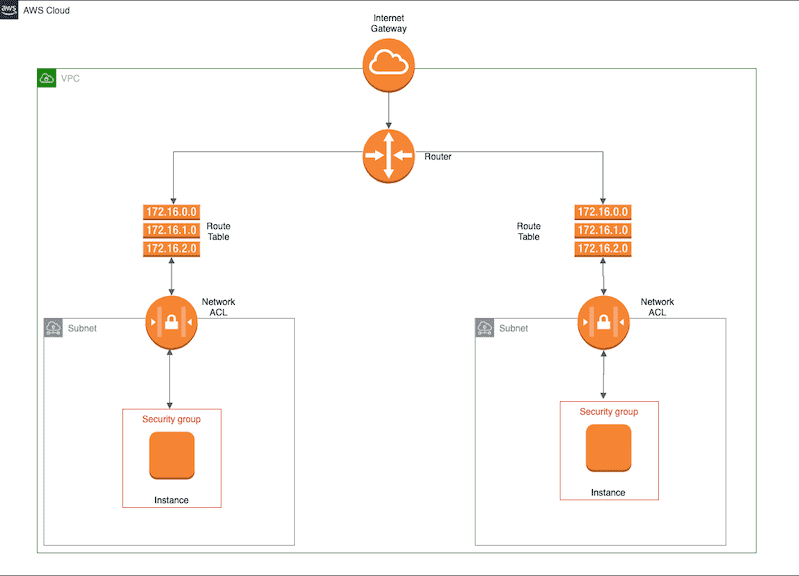
2. Route Table, NACL, Security Group
Handling of Incoming Requests to EC2 instances.
- Route Table:
- The request is first evaluated at the Route Table to determine where the traffic should go (e.g., inside the VPC, to a subnet, or toward the internet via an Internet Gateway).
- The Route Table handles routing only, not traffic filtering.
- Network ACL (NACL):
- NACL is associated at the subnet level inside the VPC.
- It evaluates inbound and outbound traffic based on its rules to allow or deny traffic for that subnet.
- NACL acts as a stateless firewall at the subnet level. It processes each request independently without remembering previous requests.
- Security Group:
- If the request is for an EC2 instance, it is further filtered by the Security Group attached to the instance.
- Security Groups are stateful firewalls applied at the instance level, allowing or denying traffic based on configured rules.
- There are no "deny" rules in a Security Group. Any traffic not explicitly allowed is automatically denied.
- Subnets are implicitly associated with the main route table if no other route table is explicitly attached to them.
1. Access AWS VPC Resources from On-Premises/externally
- AWS Site-to-Site VPN
- Establishes a secure connection between your on-premises network and AWS VPC over the internet.
- Useful for low to medium bandwidth requirements and quick setup.
- AWS Direct Connect (DX)
- A dedicated, private connection between your on-premises data center and AWS.
- Offers low latency, high bandwidth, and consistent performance.
- Can be used with a Direct Connect Gateway for accessing multiple VPCs across Regions.
- AWS Outposts
- Extends AWS infrastructure to your on-premises environment.
- Allows access to VPC resources locally without external connectivity.
- An Outpost is a pool of AWS compute and storage capacity deployed at a customer site.
- PrivateLink (VPC Endpoint Services)
- Allows on-premises resources to securely access AWS services (like S3, DynamoDB) or privately expose services hosted in AWS.
- Uses a combination of VPN, Direct Connect, and VPC endpoints for secure communication.
- Hybrid Connectivity Tools
- AWS Storage Gateway: For hybrid storage scenarios with on-premises access to S3, EFS, or other AWS storage services.
- Amazon DataSync: For data transfer between on-premises storage and AWS.
3. Question based on VPC endpoint
An application running in a private subnet accesses an Amazon DynamoDB table. The data cannot leave the AWS network to meet security requirements. How should this requirement be met?
- Configure a Network ACL on DynamoDB to limit traffic to the private subnet.
- Enable DynamoDB encryption at rest using an AWS Key Management Service (AWS KMS) key.
- Add a NAT gateway and configure the route table on the private subnet.
- Configure a VPC endpoint for DynamoDB and configure the endpoint policy. (
Correct)