Amazon CloudFront is a web service that helps distribute content globally with low latency and high transfer speeds.
- It is
not designed for regional failoveror dynamic content routing. Use Global Accelerator service instead which is a global service. - CloudFront can only route to multiple origins based on content type and not on the basis of the price class.
- AWS
WAF is integrated with Amazon CloudFront, allowing inspection of HTTP(S) requestsat the edge location before forwarding to your origin. CloudFront doesn't "forward requests to WAF"; rather, WAF is associated with CloudFront and inspects requests at the edge.
1. Origins for different content types
CFN uses cache control headers to identify static and dynamic content, allowing to use multiple origins for different content types on a single site.
- Amazon S3 for static content (e.g., images, videos).
- Amazon EC2 for dynamic content (e.g., database-driven websites).
- Custom origins for third-party content (e.g., external servers such as on-premises servers).
An origin server stores the original version of your content, and it can be an Amazon S3 bucket, an EC2 instance, or any custom HTTP server you manage.
2. Key components and concepts of Amazon CloudFront
- Edge Locations
- These are globally distributed data centers where CloudFront caches your content.
- There are 200+ edge locations worldwide, ensuring content is closer to end-users, reducing latency.
- Edge locations serve cached content to provide faster responses and reduce the load on the origin server.
- Regional Edge Caches
- Larger than edge locations, these act as intermediate caches.
- Store content accessed less frequently but still help reduce origin load.
- Improve performance for less common requests.
Distributionis the primary configuration unit in CloudFront. It defines:- The primary configuration unit in CloudFront.
- Defines:
- Origins (where the content comes from)
- Behaviors (rules for caching and delivery)
- Domain Name (the unique URL ending in
.cloudfront.netor a custom domain).
- Behaviors: Rules that dictate how specific content paths are cached and delivered.
- For example, different caching rules for different content types
/images/*can have one set of caching rules./videos/*can have another.
- For example, different caching rules for different content types
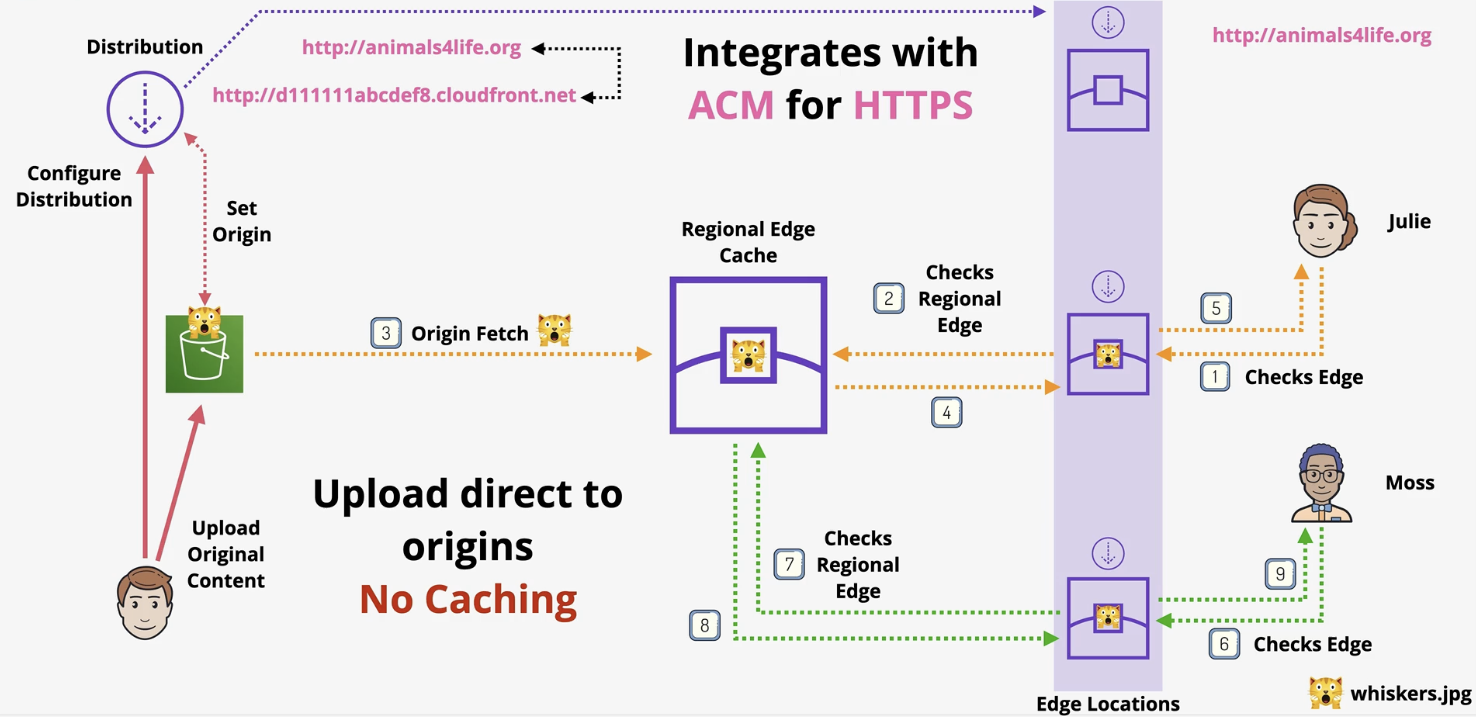
3. Scenarios Where Content Bypasses the Regional Edge Cache
- Dynamic Content: Content requiring headers, cookies, or query parameters for decisions.
- HTTP Methods: Requests using PUT, POST, PATCH, OPTIONS, or DELETE.
- Cache-Control Headers: Requests with
Cache-Control: no-storeorCache-Control: private. - Signed URLs/Cookies: Secure access via signed URLs or cookies bypasses the cache.
- Expired Cache TTL: Requests for content with expired TTL go to the origin.
- Query String Parameters: Forwarding query strings triggers a direct origin request.
- Custom Cache Behavior: Configurations forwarding headers, cookies, or query strings.
4. Typical order of placement for CloudFront, ELB, and Route 53
Correct Order - Route 53 → CloudFront (optional for caching) → ELB → Backend (e.g., EC2 instances or containers). If CloudFront is not used, the order is: Route 53 → ELB → Backend.
- Route 53: Acts as the DNS resolver, routing the client’s request to the appropriate endpoint (e.g., CloudFront or ELB).
- CloudFront:
- Optionally placed in front of ELB to cache and deliver content with low latency, especially for APIs requiring edge delivery.
- It routes traffic to the backend (ELB) based on the origin configuration.
- ELB (Elastic Load Balancer): Distributes incoming requests to the appropriate set of EC2 instances, containers, or Lambda functions running the REST API.
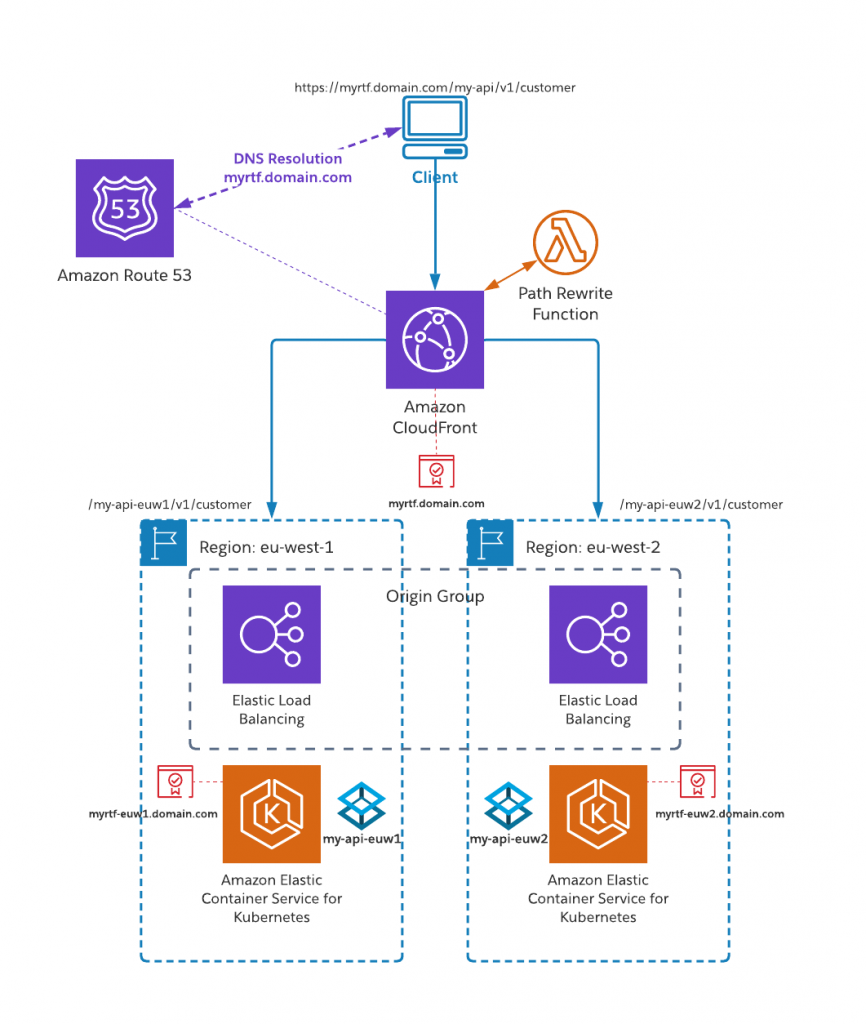
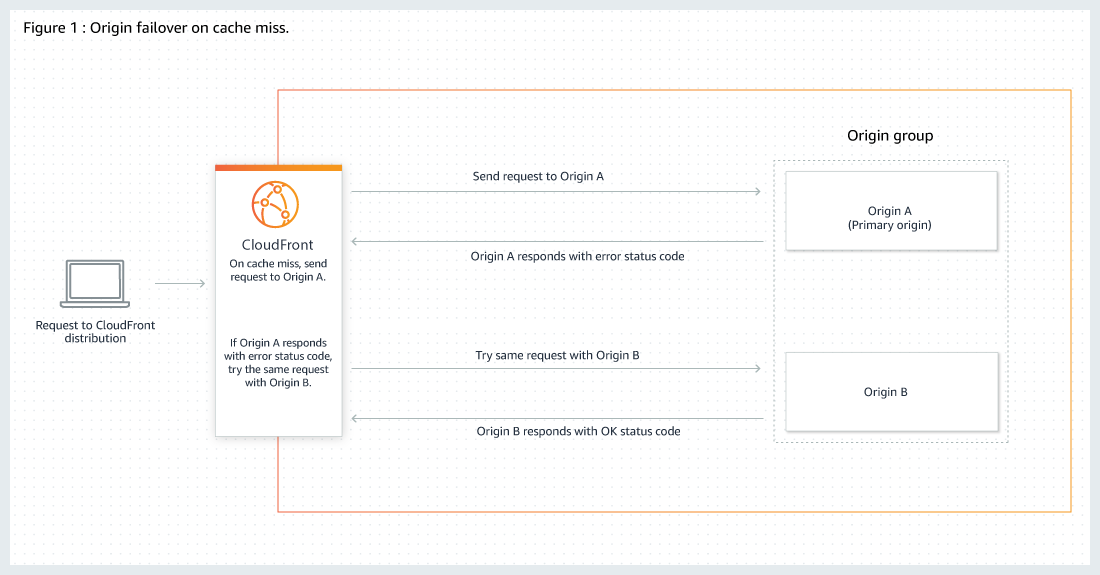
5. Origin group with primary and secondary origins for high-availability and failover
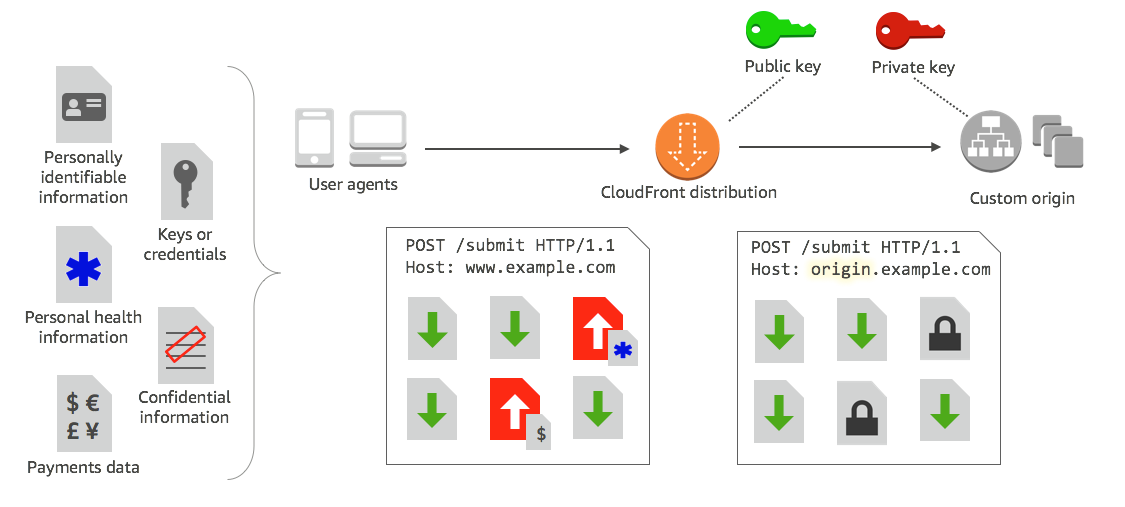
5. Field level encryption to protect sensitive data for specific content
Field-level encryption allows you to enable users to securely upload sensitive information to your web servers. user data is encrypted at the edge, and remains encrypted throughout your entire application stack.
To use field-level encryption, Configure CloudFront distribution, specify the set of fields in POST requests that you want to be encrypted, and the public key to use to encrypt them.
You can encrypt up to 10 data fields in a request. (You can’t encrypt all of the data in a request with field-level encryption; you must specify individual fields to encrypt.)
7. Restrict the geographic distribution of your content
To implement geographic restrictions (geo-blocking) with Amazon CloudFront, you can prevent users from specific geographic locations from accessing content by using one of the following two options:
- CloudFront Geographic Restrictions (Geo Restriction):
- CloudFront determines the country of the request based on the viewer's IP address and the GeoIP database.
- Access can be allowed or denied to specific countries by setting up a whitelist (allow-list) or blacklist (deny-list).
- Custom Geo Restriction Using Lambda@Edge:
- Lambda@Edge executes custom logic at the CloudFront edge location before serving content.
- You can inspect and analyze HTTP headers, such as the CloudFront-Viewer-Country header, to determine the geographic location of the viewer.
Choose CloudFront Geo Restriction for simplicity or Lambda@Edge for advanced, customizable geo-blocking scenarios.
8. Protecting Web Applications Using AWS WAF + Amazon CloudFront
AWS WAF, when integrated with Amazon CloudFront, allows you to protect web applications regardless of where the webserver is hosted—whether it’s running on Amazon EC2, managed on-premises, or any other infrastructure.
9. Access Control
- S3 Origins: Use OAC (preferred) or Origin Access Identity (OAI) to restrict direct bucket access.
- Custom Origins: Secure using custom headers that validate requests from CloudFront.
- Protocol Policies: Define how CloudFront communicates with the origin (HTTP or HTTPS).
10. Question: CloudFront Custom origin
A company's dynamic website is hosted using on-premises servers in the United States. The company is launching its product in Europe, and it wants to optimize site loading times for new European users. The site's backend must remain in the United States. The product is being launched in a few days, and an immediate solution is needed. What should the solutions architect recommend?
- Launch an Amazon EC2 instance in us-east-1 and migrate the site to it.
- Move the website to Amazon S3. Use Cross-Region Replication between Regions.
- Use Amazon CloudFront with a custom origin pointing to the on-premises servers.(
Correct Ans) - Use an Amazon Route 53 geoproximity routing policy pointing to on-premises servers.
Explanation:CloudFront supports custom origins, such as on-premises servers, allowing it to fetch uncached content from the backend in the U.S. when needed.
Option 4 is incorrect as Route 53 geoproximity routing directs traffic to specific geographic locations but does not reduce latency or improve loading times for European users. It also does not address the requirement to keep the backend in the U.S.