Elastic Load Balancer
Traffic Flow (Request Entering):
Client Request → Gateway Load Balancer (L3) → Network Load Balancer (L4) → Application Load Balancer (L7) → EC2 / AWS Resources
Example - User Request → GWLB (Firewall) → NLB (TCP Routing) → ALB (URL-Based Routing) → EC2 Web App
1. Throttle API requests
Elastic Load Balancer(ALB/NLB/..) cannot throttle API requests. Use API gateway for this.
2. Routes traffic based on content of the request
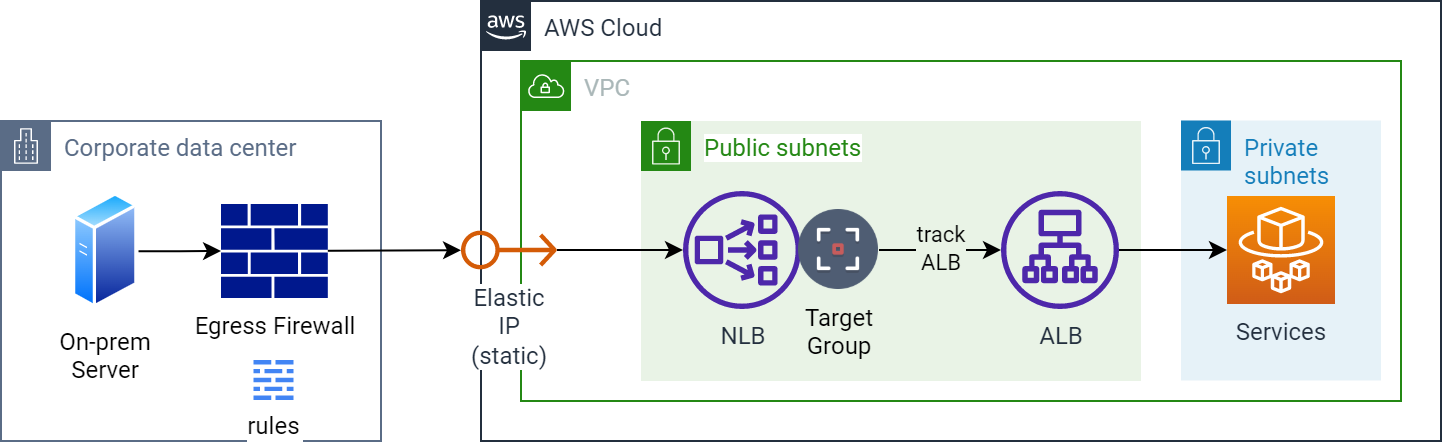
The Application Load Balancer (ALB) is best suited for load balancing HTTP and HTTPS traffic. It offers advanced request routing, making it ideal for modern application architectures such as microservices and containers. Operating at the application layer/individual request level (Layer 7), the ALB routes traffic to targets within an VPC based on the content of the request, such as URL path or host headers.
3. Gateway Load Balancer (Layer 3) > Network Layer (routes IP traffic, GWLB uses Geneve encapsulation)
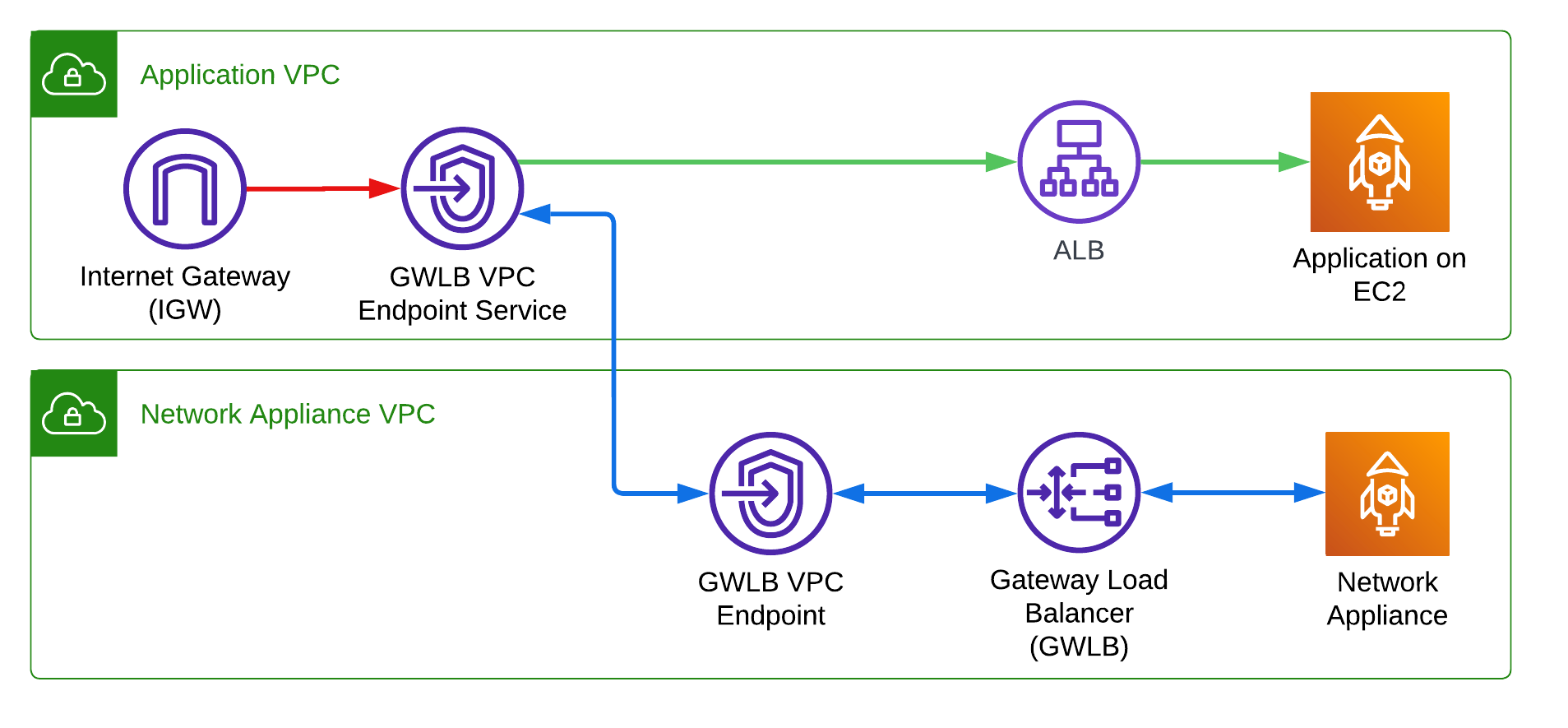
- Gateway Load Balancer (GWLB) operates at the Network Layer (Layer 3) in the OSI model.
- GWLB is specifically designed to handle network packet-level traffic.
- It suitable for use cases like third-party virtual appliances, including firewalls, intrusion detection systems (IDS), and deep packet inspection.
- Ensures traffic from the same session is consistently routed to the same appliance for stateful processing.
- Ideal Use Cases:
- Traffic Inspection: Deploying firewalls, intrusion prevention/detection systems (IPS/IDS), or deep packet inspection (DPI) tools.
- Compliance and Security: Enforcing security policies or regulatory compliance with third-party appliances.
- How it Works:
- Traffic is directed to the Gateway Load Balancer endpoint (GWLB Endpoint), typically deployed in a VPC.
- GWLB forwards traffic to virtual appliance instances (e.g., firewalls) in a target group for processing.
- Processed traffic is returned to the GWLB and routed to the intended destination.
4. Network Load Balancer (Layer 4) > Transport Layer (TCP/UDP traffic)
- Network Load Balancer (NLB) works at the Transport Layer (Layer 4) of the OSI model.
- NLB routes traffic based on TCP, UDP, and TLS protocols.
- NLB support HTTP, HTTPS and TCP health checks.
- NLBs only allow EC2 instances or IP addresses as targets. Unlike an ALB(ALB), NLBs do not allow you to provide a URL or domain name as a target.
- It is designed for ultra-low latency and high performance, capable of handling millions of requests per second.
- Routing decisions are made based on the IP address and port.
- Doesn't inspect the content of the packets; focuses only on efficiently routing traffic based on connection metadata.
- Use Case: Applications requiring high throughput like Financial services, gaming, or real-time applications.
5. Application Load Balancer (Layer 7) > Application Layer (HTTP/S, WebSockets, etc.)
An Application Load Balancer (ALB) is a Layer 7 load balancer that routes HTTP and HTTPS traffic to different targets based on URL paths, hostnames, query string parameters, HTTP headers, HTTP Method, and Source IP Address CIDR.
- Layer 7 corresponds to the Application Layer in the OSI model.
- Operates at request level, interpreting the content of HTTP, HTTPS, and WebSocket protocols.
- Application and Classic Load Balancers expose a fixed DNS (=URL) rather than the IP address.
- Routes traffic to targets – Amazon EC2 instances, containers, IP addresses and AWS Lambda functions based on:
- The content of the request.
- Example: Redirecting traffic for
api.example.comvs.www.example.com.
- Can make decisions based on application-specific content (e.g., sending requests to different target groups based on a query string).
- Ideal for:
- Complex routing needs (content-based routing).
- Web applications and microservices.
- Use cases: Multi-tenant SaaS applications or modern web apps.

6. Routing Features of ALB(Layer 7)
- Path-based Routing: Routes traffic based on the URL path (e.g.,
x.com/ordersorx.com/products).- Requests for
https://www.example.com/ordersgo to the orders microservice. - Requests for
https://www.example.com/productsgo to the products microservice.
- Requests for
- Host-based Routing Routes traffic based on the Host header (e.g.,
www.example.comorapi.example.com).- Requests for
www.example.comgo to one target group. - Requests for
api.example.comgo to another target group.
- Requests for
- HTTP Header-based Routing: Routes traffic based on values in the HTTP headers (e.g., custom headers like
X-Request-Type).- Requests with the header
X-Request-Type: Ordergo to the orders microservice. - Requests with the header
X-Request-Type: Productgo to the products microservice.
- Requests with the header
- Query String Parameter-based Routing: Routes traffic based on query string parameters in the URL (e.g.,
?category=electronics).- Requests for
www.example.com/products?category=electronicsgo to one microservice. - Requests for
www.example.com/products?category=clothinggo to another.
- Requests for
- Source IP Address CIDR-based Routing: Routes traffic based on the source IP address (CIDR block) of the client making the request.
- Requests from IP range
192.168.1.0/24route to one microservice. - Requests from
10.0.0.0/16route to another.
- Requests from IP range
- HTTP Method-based Routing: Routes traffic based on the HTTP method (e.g., GET, POST, PUT).
- Requests using the
GETmethod route to one microservice. - Requests using the
POSTmethod route to another microservice.
- Requests using the
7. SSL/TLS
SSL (Secure Sockets Layer) and TLS (Transport Layer Security) are cryptographic protocols that provide secure communication over a network.
SSL is the older version, now replaced by TLS. TLS is modern and more secure. TLS 1.3 is the latest
- Purposes of SSL/TLS:
- Encryption: Protects data by encrypting communication between the client and server.
- Authentication: Verifies the identity of the server to ensure you're communicating with the correct entity.
- Data Integrity: Ensures that data isn’t altered or tampered with during transmission.
- SSL/TLS Certificates:
- Issued by Certificate Authorities (CAs).
- Domain Validation (DV): Basic certificate validation.
- Wildcard Certificates: Secure multiple subdomains.
- Multi-Domain (SAN) Certificates: Secure multiple domains.
- Best Practices:
- Use TLS 1.2 or 1.3; disable outdated protocols (SSL 2.0/3.0).
- Use SSL/TLS certificates for authentication and encryption.
- Use SNI (Server Name Indication) for hosting multiple SSL certificates on the same IP.
8. Server Name Indication (SNI)
- Server Name Indication (SNI) is an
extension of the SSL/TLS protocol that allows multiple SSL certificatesto be hosted on a single IP address and port. - This allows the server to select the correct SSL certificate for the requested domain.
- Benefits of SNI:
- Efficient: Avoids the need for separate IP addresses for each SSL certificate.
- Flexibility: You can assign a unique SSL certificate to each domain or subdomain.
- Security: Helps in maintaining isolation between different domains or services.
- Configuring SNI in AWS ALB:
- Create Certificates using AWS Certificate Manager (ACM) or import SSL certificates for each domain/subdomain you want to secure.
- Create ALB by following the usual setup process for a load balancer.
- In the Listeners tab, choose HTTPS (Port 443) as the listener protocol.
- Create multiple HTTPS listeners, each with its own SSL certificate, using SNI to match certificates to domains.
- add multiple certificates in listener configuration.
- AWS ALB uses SNI to match the correct certificate based on the requested hostname.
- Wildcard SSL Certificate:
- While it can support multiple subdomains, it does not cater well to different domains (e.g.,
mycorp.comandyourcorp.com). - It also lacks flexibility compared to SNI, especially if additional domains need to be added later.
- While it can support multiple subdomains, it does not cater well to different domains (e.g.,
9. Registered and DeRegistered targets
By default, the Application Load Balancer waits 300 seconds before the completion of the deregistration process, which can help in-flight requests to the target become complete. To change the amount of time that the Application Load Balancer waits, update the deregistration delay value.
https://docs.aws.amazon.com/elasticloadbalancing/latest/application/load-balancer-target-groups.html#deregistration-delay
10. Cross-Zone Load Balancing
Cross-Zone Load Balancing ensures that traffic is evenly distributed across instances in all configured Availability Zones, improving fault tolerance and scalability.
- Application Load Balancer (ALB): By default, cross-zone load balancing is enabled.
- Network Load Balancer (NLB): By default, cross-zone load balancing is disabled.
11. Question: ALB and NLB
A company's HTTP application is behind a Network Load Balancer (NLB). The NLB's target group is configured to use an Amazon EC2 Auto Scaling group with multiple EC2 instances that run the web service. The company notices that the NLB is not detecting HTTP errors for the application. These errors require a manual restart of the EC2 instances that run the web service. The company needs to improve the application's availability without writing custom scripts or code. What should a solutions architect do to meet these requirements?
- Enable HTTP health checks on the NLB, supplying the URL of the company's application.
Replace the NLB with an Application Load Balancer. Enable HTTP health checks by supplying the URL of the company's application. Configure an Auto Scaling action to replace unhealthy instances.(Correct Ans)
*Explanation: Option 1 is incorrect because NLB supports HTTP and HTTPS Health Checks, BUT you can't put any URL (as proposed), only the node IP addresses.